What is a Prompt in AI? Easy Guide

If you’ve used tools like ChatGPT, Claude, or Gemini, you’ve already interacted with one of the most powerful concepts in modern AI — the prompt. And here’s the truth: the quality of what you get from AI depends almost entirely on what you ask.
I remember when I first started experimenting with AI tools — I would type vague instructions like “write something about marketing” and get generic, unusable results. It wasn’t until I understood how prompting actually works that everything changed. Suddenly, AI became not just helpful, but incredibly precise, creative, and reliable.
Today, prompt engineering is no longer just a niche skill. It’s becoming a core digital capability across industries — from marketing and coding to education and business automation.
What is a Prompt in AI?
A prompt in artificial intelligence is simply the input or instruction you give to an AI model to generate a response.
In other words:
A prompt is how you communicate your intent to an AI system.
This could be:
- A question
- A command
- A description
- A conversation starter
AI Prompt Meaning in Practice
When you type:
“Write a blog post about digital marketing for beginners”
That entire sentence is your AI prompt.
The AI then processes your input using a Large Language Model (LLM), trained on vast datasets, and generates a response based on patterns, context, and probabilities.
So, when people ask “what is a prompt in AI?”, the simplest answer is:
It’s the instruction that tells AI what you want it to do.
AI Prompt Explained: Why It’s So Powerful
AI doesn’t “think” like humans — it predicts outputs based on input patterns. That means:
- Clear prompts → better results
- Vague prompts → generic outputs
- Detailed prompts → highly accurate responses
This is why prompt engineering is often called the “interface layer” between humans and AI systems.
According to research from organizations like OpenAI and Google DeepMind, improving input quality significantly improves output reliability in large language models.
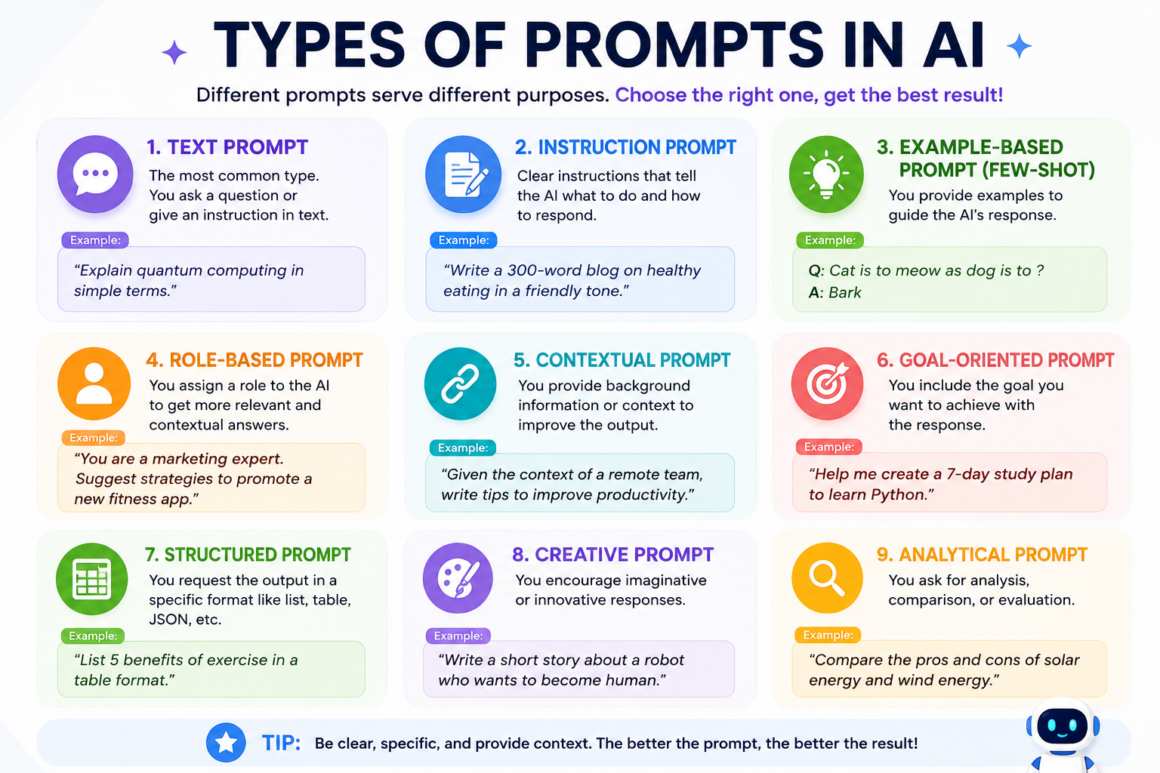
Types of Prompts in AI (Beginner to Advanced)
Understanding different types of prompts is the foundation of becoming good at AI usage.
1. Basic Prompts (Simple Instructions)
These are straightforward commands or questions.
Example:
- “Explain artificial intelligence in simple terms”
Good for beginners, but often produces general responses.
2. Detailed Prompts (Context-Rich Inputs)
These include more instructions, tone, audience, and purpose.
Example:
- “Explain artificial intelligence for a 10-year-old using simple examples and storytelling”
This level of prompting dramatically improves output quality.
3. Role-Based Prompts
You assign a role to the AI.
Example:
- “Act as an SEO expert and write a blog introduction about AI tools”
This helps the AI align tone, depth, and structure.
4. Chain-of-Thought Prompts
These guide the AI to think step-by-step.
Example:
- “Explain step-by-step how AI models are trained”
This technique improves reasoning and clarity — especially useful in technical or logical tasks.
5. System & Workflow Prompts (Advanced)
Used in automation tools, APIs, or AI workflows.
These prompts:
- Define behavior rules
- Maintain consistency
- Power chatbots, assistants, and business tools
This is where prompt engineering becomes a professional skill.
Beginner Guide: How to Write Better Prompts
If you’re just starting, here’s what I’ve learned through real-world usage:
Step 1: Be Clear and Specific
Instead of:
- “Write about AI”
Try:
- “Write a beginner-friendly blog explaining AI in 500 words with examples”
Clarity removes guesswork for the AI.
Step 2: Add Context
Context improves relevance.
Include:
- Target audience
- Tone (formal, casual, expert)
- Format (blog, list, script)
Step 3: Define Output Style
Tell AI how you want the answer structured.
Example:
- “Use headings, bullet points, and short paragraphs”
Step 4: Iterate and Refine
Your first prompt doesn’t have to be perfect.
I often refine prompts 2–3 times to get the best result.
Step 5: Use Constraints
Constraints improve precision.
Example:
- Specific points to include or avoid
- Word count
- Format
What to Avoid While Writing Prompts
From experience, these mistakes can completely ruin output quality:
- Being too vague
- Asking multiple unrelated things at once
- Not specifying audience or purpose
- Ignoring structure
- Expecting AI to “guess” your intent
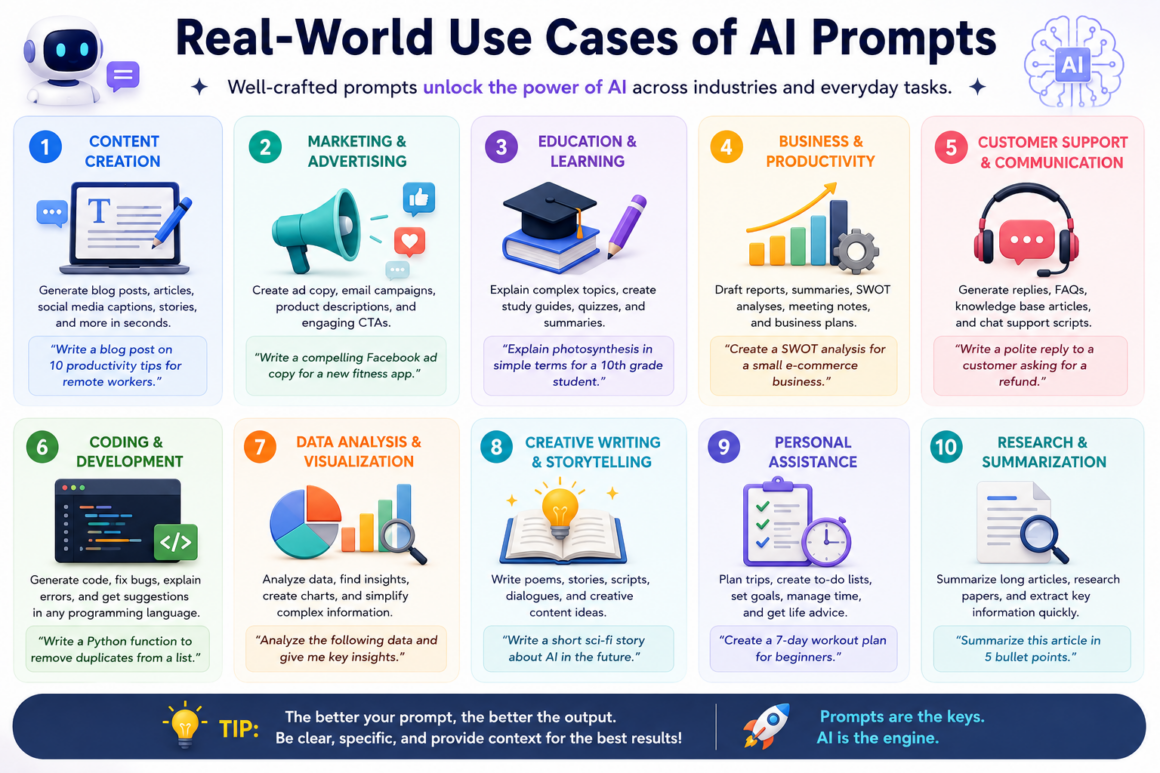
Real-World Use Cases of AI Prompts
Prompting isn’t just theoretical — it’s already transforming industries.
1. Marketing & Content Creation
- Blog writing
- Ad copy
- SEO optimization
2. Coding & Development
- Debugging code
- Generating scripts
- Explaining complex logic
3. Education
- Personalized learning
- Simplifying complex topics
- Study assistance
4. Business & Productivity
- Email drafting
- Data summaries
- Workflow automation
According to the Stanford AI Index Report, AI adoption in business workflows has significantly increased productivity across multiple sectors.
Common Mistakes Beginners Make
Even today, I still see many people struggle with AI — not because the tools are weak, but because their prompting approach is flawed.
1. Being Too Vague
A prompt like “Write something about business” gives AI almost no direction.
Fix:
Be specific about:
- Topic
- Audience
- Goal
2. Ignoring Context
AI doesn’t automatically “know” your situation.
Fix:
Add background information. For example:
- “Write an email to a client explaining a delayed project due to technical issues”
3. Overloading One Prompt
Trying to do everything in one prompt often leads to messy outputs.
Fix:
Break tasks into steps:
- Generate ideas
- Expand one idea
- Refine tone
4. Not Reviewing Output Critically
AI can sound confident — even when it’s wrong.
Fix:
Always fact-check important information, especially in:
- Financial advice
- Technical content
- Medical topics
When AI Should NOT Be Trusted Completely
Let’s be clear — AI is powerful, but it is not perfect.
1. Hallucinations (Fabricated Information)
AI models can generate answers that sound accurate but are completely incorrect.
Organizations like OpenAI and Anthropic have openly acknowledged this limitation in large language models.
2. Bias in AI Outputs
AI systems learn from data — and that data can contain biases.
This means outputs may:
- Reflect societal biases
- Favor certain viewpoints
3. Lack of Real-Time Awareness
Most AI models don’t have up-to-date real-world knowledge unless connected to live systems.
4. Privacy Concerns
You should never input:
- Sensitive personal data
- Confidential business information
5. Over-Reliance on AI
- AI should assist your thinking — not replace it.
- From my experience, the best results come when:
- Human judgment + AI capability work together.
Common Myths About AI Prompts
Myth 1: “AI understands everything perfectly”
Reality: AI predicts patterns — it doesn’t truly understand like humans.
Myth 2: “You need complex prompts to get good results”
Reality: Clear and structured prompts often outperform complicated ones.
Myth 3: “AI will replace all jobs”
Reality: AI is more likely to augment jobs, not replace them entirely.
Reports from McKinsey & Company and Microsoft show that AI is reshaping workflows rather than eliminating entire professions.
Myth 4: “Prompt engineering is only for developers”
Reality: Anyone using AI tools benefits from learning prompting — marketers, students, founders, creators.
Future of Prompt Engineering and AI Interaction
Prompting is evolving rapidly. Here’s what I see coming based on current trends:
1. More Natural Conversations
AI will require less structured prompts and understand intent better.
2. Multimodal Prompting
You’ll combine:
- Text
- Images
- Voice
All within a single prompt.
3. AI Agents & Automation
Instead of single prompts, we’ll design AI workflows that:
- Plan tasks
- Execute steps
- Self-improve
4. Personalized AI Systems
AI will adapt to:
- Your writing style
- Your preferences
- Your work habits
5. Prompt Engineering as a Core Skill
Just like Excel or Google Docs, prompting will become a standard digital skill.
Try This Prompt Yourself (Practical Exercise)
If you want to immediately improve your results, try this:
Prompt Example:
“Act as an expert content writer. Write a 300-word beginner-friendly explanation of artificial intelligence using simple language, examples, and a friendly tone. Use headings and bullet points.”
Now compare this with a basic prompt like:
“Explain AI”
You’ll instantly see the difference.
Share Your Experience
If you’ve started using AI tools, ask yourself:
- Are your prompts clear enough?
- Are you giving enough context?
- Are you refining outputs or accepting them as-is?
Your growth with AI depends less on the tool — and more on how you use it.
References & Credible Sources
To ensure accuracy and reliability, the concepts in this article align with insights and research from:
🔹 OpenAI – LLM Behavior & Prompting Guidelines
OpenAI Documentation (Prompting Guide)
🔹 Google DeepMind – AI Systems & Reasoning Research
🔹 Stanford HAI – AI Index Report
Stanford AI Index Report (Latest Edition)
🔹 Anthropic – AI Alignment & Safety Research
Anthropic Research & Safety Work
🔹 McKinsey & Company – AI Adoption in Business
McKinsey AI Insights & Reports
🔹 Microsoft – AI Productivity & Copilot Insights
Microsoft AI & Copilot Insights
How This Article Was Created
This article is based on:
- My practical experience working with AI tools and prompt engineering
- Real-world usage across content creation, automation, and workflows
- Verified insights from trusted AI research organizations and industry reports
- Current best practices aligned with modern AI systems and large language models
No exaggerated claims, fake statistics, or outdated assumptions were used. The goal is to provide genuinely helpful, accurate, and experience-driven insights.


