Port Checker
Test whether a TCP port is reachable on a public domain or IP address.
The test runs from the SITESCS server, so firewall and hosting-network rules can affect the result.
How Port Checker Works
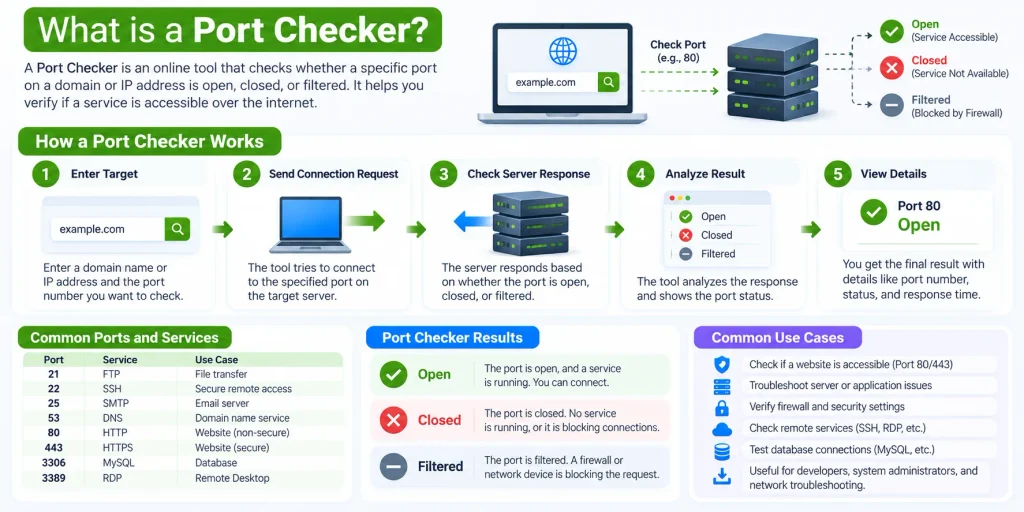
A Port Checker tests whether a specific TCP port on a public server, domain, or IP address can accept a connection. You enter a host and a port number, and the tool tries to connect to that destination from the SITESCS server.
If the connection succeeds, the port is shown as open. If the connection is refused, blocked, or times out, the tool may show it as closed, filtered, or not reachable depending on the response received.
For example, if you enter example.com with port 443, the checker tests whether that server is accepting HTTPS connections on port 443. It does not log in to the server or access private files; it only tests basic network connectivity.
What Is a Port?
A network port is a numbered communication endpoint used by computers and servers to separate different services. An IP address identifies the device or server, while the port number helps identify the specific service running on it.
For example, a web server may use port 80 for HTTP and port 443 for HTTPS. Another service on the same server can use a completely different port, allowing multiple services to run on one IP address.
Port numbers range from 1 to 65535. Some numbers are commonly associated with specific services, while others may be used by custom applications or private server software.
What Does an Open Port Mean?
An open port means a service is listening on that port and accepted the TCP connection made by the checker. This usually indicates that the service is running and reachable from the network where the test was performed.
For example, if port 443 is open on a website server, HTTPS traffic can usually reach that server. An open port alone does not tell you whether the application behind it is configured correctly or whether authentication will succeed.
It also does not automatically mean the port is unsafe. Many ports are intentionally open because websites, email servers, remote-access tools, and other applications need them to communicate.
What Does a Closed Port Mean?
A closed port usually means the target server was reachable, but no service accepted the connection on that port. The server may respond by refusing the connection, which tells the checker that the port is not currently listening.
This may happen because the application is stopped, the wrong port number was entered, or the service is configured to use another port. A closed port can be completely normal if that service is not supposed to be available.
For troubleshooting, you should confirm that the application is running and listening on the expected port before changing firewall or router settings.
What Does a Timed-Out Port Mean?
A timeout means the checker sent a connection request but did not receive a clear response before the test ended. This often happens when a firewall silently drops the connection instead of accepting or rejecting it.
A timeout may also be caused by routing problems, security groups, hosting restrictions, network congestion, or a server that is offline. Because several conditions can create the same result, a timeout should not automatically be treated as proof that the port is closed.
If the service should be publicly available, check the server firewall, hosting firewall, router rules, and the service configuration.
Open vs Closed vs Filtered Ports
An open port accepts the connection, while a closed port normally rejects it because no service is listening. A filtered port is different because a firewall or another network device may prevent the checker from receiving a useful response.
From the outside, filtered ports often appear as timeouts. That means a simple port checker may not always be able to distinguish perfectly between a filtered connection and another type of network failure.
This is why port-check results should be used together with your server logs, firewall configuration, and application settings when troubleshooting a problem.
Why Would You Check a Port?
A port check can quickly tell you whether a service is reachable from outside your server or network. This is useful after configuring a website, mail server, game server, remote desktop service, VPN, or another network application.
It can also help after changing firewall rules, moving to new hosting, changing server software, or configuring port forwarding. Instead of guessing whether the service is reachable, you can test the exact host and port.
For website troubleshooting, ports 80 and 443 are common starting points. For other services, use the port number configured by your application or server administrator.
Common Port Numbers
Some ports are widely used for standard internet services. Knowing these common ports can make troubleshooting easier because you can quickly check whether the expected service is reachable.
Common examples include 80 for HTTP, 443 for HTTPS, 22 for SSH, 21 for FTP, 25 for SMTP, 53 for DNS, and 3389 for Remote Desktop. However, administrators can configure many services to use different port numbers.
A service using a non-standard port is not automatically suspicious. Custom ports are common in development environments, internal applications, control panels, and specialized server setups.
Port 80 — HTTP
Port 80 is commonly used for regular HTTP website traffic. When someone visits a website without encryption, the connection may be sent to the server through this port.
Many modern websites automatically redirect port 80 traffic to HTTPS on port 443. Because of this, port 80 may still remain open even when the website itself primarily uses encrypted HTTPS connections.
If a website does not open through HTTP, checking port 80 can help determine whether the web server or firewall is accepting HTTP traffic.
Port 443 — HTTPS
Port 443 is the standard port commonly used for HTTPS traffic. It allows browsers and servers to communicate through an encrypted TLS connection.
If a website works correctly over HTTPS, port 443 normally needs to be reachable from the internet. When it is blocked or closed, visitors may receive connection errors before the website itself can even load.
If port 443 is open but HTTPS still fails, the problem may instead involve the SSL certificate, web-server configuration, domain settings, or application.
Port 22 — SSH
Port 22 is commonly associated with SSH, which is widely used for secure remote server administration. Linux servers, VPS environments, and development systems often use SSH for command-line access.
Some administrators change SSH to another port for operational or security reasons. In that case, testing port 22 may show it as closed even though SSH is available on a different configured port.
If you are troubleshooting SSH access, check the actual SSH port in the server configuration before assuming that the service is offline.
Port 25 — SMTP
Port 25 is commonly used for SMTP communication between mail servers. Hosting companies and internet providers sometimes restrict outbound connections on this port to reduce spam and abuse.
Because of these restrictions, a port checker may show different results depending on where the test is performed. Other mail-related ports such as 465 or 587 may also be used depending on the email setup.
If you are troubleshooting email, do not rely on port 25 alone. Check your mail server documentation and the exact port required for your connection type.
Port 53 — DNS
Port 53 is commonly used for DNS traffic. DNS can use both UDP and TCP depending on the type and size of the request.
A basic TCP Port Checker tests TCP connectivity, so an open TCP port 53 does not tell you everything about how DNS is working. A separate DNS lookup tool is usually better for checking actual DNS records and resolution.
Still, checking TCP port 53 can be useful when diagnosing a DNS server that is expected to accept TCP connections.
Port 3389 — Remote Desktop
Port 3389 is commonly associated with Microsoft Remote Desktop Protocol, or RDP. Windows servers and some business networks use RDP for remote graphical access.
Exposing RDP directly to the public internet can create security risks if it is not properly protected. Many administrators place RDP behind a VPN, firewall allowlist, gateway, or another secure access layer.
If port 3389 appears closed, that may be intentional rather than a problem.
Why Is My Port Closed?
A port can appear closed for several reasons. The service may not be running, it may be listening on another port, or the operating-system firewall may be blocking incoming connections.
The hosting provider may also have its own firewall or security group. Even if the application and server firewall are configured correctly, an external network rule can still prevent the connection from reaching your server.
Another common cause is binding. A service configured to listen only on 127.0.0.1 can work locally on the server while remaining unreachable from the internet.
Why Is My Port Open Locally but Closed Online?
A service may work on the same computer but still be unavailable from the public internet. Local access only proves that the application is running; it does not prove that outside traffic can reach it.
Your firewall, router, NAT configuration, hosting security group, or port-forwarding rules may still block external access. The application may also be listening only on a local interface instead of the public network interface.
An external port checker is useful because it tests the connection from outside the target server.
Why Does Port Checker Show Closed Even Though the Service Is Running?
The service may be running but bound to the wrong network interface. For example, an application listening only on localhost cannot normally accept connections from external users.
A firewall can also block incoming traffic even while the application is active. Cloud hosting platforms often add another firewall layer through security groups, network rules, or access-control lists.
You should check both the application and every firewall layer between the internet and the server.
What Is Port Forwarding?
Port forwarding is a router feature that sends incoming connections from a public port to a specific device inside a private network. It is commonly used when hosting a service from a home or office network.
For example, a router can receive traffic on a public port and forward it to a computer running a game server or web application. Without the correct forwarding rule, the service may work inside the local network but remain inaccessible from the internet.
Port forwarding is generally not needed when using a normal VPS or cloud server with its own public IP address.
Why Port Forwarding May Not Work
A forwarding rule can fail if the wrong local IP address, external port, internal port, or protocol is selected. The destination device also needs to keep the same local IP address so the router knows where to send traffic.
Your computer firewall can still block the port after the router forwards it. Some internet providers also use Carrier-Grade NAT (CGNAT), which can prevent normal inbound port forwarding because the customer does not have a directly reachable public IPv4 address.
If forwarding looks correct but the port remains unavailable, check whether your connection uses CGNAT.
Can a Firewall Make a Port Look Closed?
Yes. Firewalls are designed to control which network connections are allowed to reach a device or service. Depending on the firewall configuration, a blocked connection may be rejected immediately or silently dropped.
An immediate rejection may appear as a closed port. A silently dropped connection often appears as a timeout because the checker receives no response.
Firewalls can exist on the server itself, on the router, inside a hosting control panel, or at the cloud-provider network level.
Does an Open Port Mean a Website Is Working?
No. An open port only means that something accepted a TCP connection on that port. It does not confirm that the website, application, or service is functioning correctly.
For example, port 443 can be open while the website still returns a server error, expired certificate warning, or application error. The network connection succeeds, but the problem occurs at a higher layer.
Use a website-response checker, HTTP status checker, or browser test when you need to confirm that the actual website is working.
Is an Open Port Dangerous?
An open port is not automatically dangerous. Servers need open ports to provide services to legitimate users, such as websites through port 443 or SSH through a controlled management port.
Risk depends on what service is running, whether it is updated, how authentication is configured, and whether the port actually needs to be publicly accessible. Unnecessary services should generally not be exposed to the internet.
If you find an unexpected open port on a server you manage, identify the application using it before deciding whether it should remain accessible.
Can a Port Checker Scan My Entire Server?
The SITESCS Port Checker is intended to test the single TCP port you enter. It is not designed as a bulk network scanner or vulnerability scanner.
Checking one known port is useful when troubleshooting a service you own or administer. It provides a simple answer about whether that destination accepted the connection from the checker server.
For deeper security auditing, administrators should use authorized security tools in environments they control.