Domain IP Lookup
Enter a domain name to find its IPv4 and IPv6 addresses.
Have you ever wondered which IP address is connected to a website? A Domain IP Lookup helps you find that out in seconds.
Just enter a domain name, such as example.com, and the tool checks its DNS records to find the server IP addresses linked to that domain. Depending on the website, you may see an IPv4 address, an IPv6 address, or both.
This can be useful for more than just curiosity. For example, you might want to confirm whether a domain is pointing to the correct server after changing hosting, check whether DNS updates have taken effect, troubleshoot a website that is not loading properly, or see whether a site supports IPv6.
You may also notice that one domain returns several IP addresses. That’s completely normal. Large websites often use multiple servers, content delivery networks, or load-balancing systems to keep their services fast and reliable.
Keep in mind that a domain’s IP address can change over time. Hosting providers, DNS settings, and CDN networks may route the same domain through different servers.
With the SITESCS Domain IP Lookup, you can quickly check available A and AAAA records and copy the results whenever you need them.
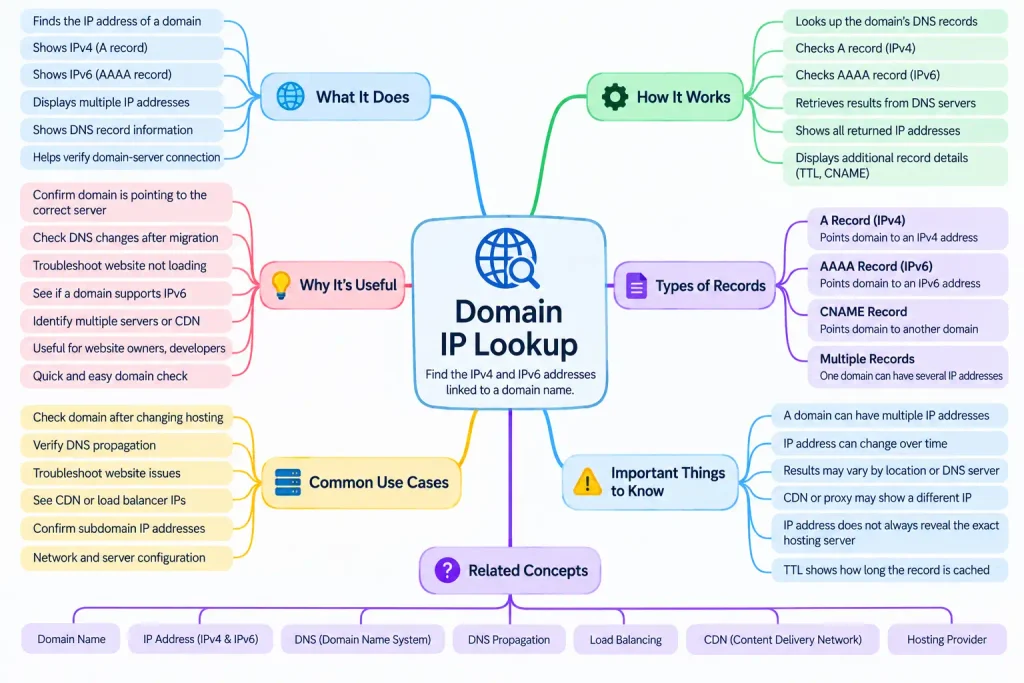
What Is a Domain IP Lookup?
A Domain IP Lookup is a simple way to find the IP address connected to a website or domain name. Instead of searching through hosting panels or DNS settings, you can enter a domain and see which IP addresses are currently linked to it.
For example, a domain such as example.com may point to one IPv4 address, one IPv6 address, or several addresses at the same time. This depends on how the website is hosted and how its DNS is configured.
The tool is especially useful when you want a quick answer without using Command Prompt, PowerShell, or other technical tools.
How Does a Domain IP Lookup Work?
When you enter a domain name, the tool checks the domain’s DNS records.
DNS is the system that connects human-friendly names, such as sitescs.com, with the numerical IP addresses used by computers and servers.
The lookup usually checks two important record types.
An A record points a domain to an IPv4 address.
An AAAA record points a domain to an IPv6 address.
If the domain has both records, the tool may show both IPv4 and IPv6 results.
Why Would You Need to Check a Domain IP?
There are several situations where checking a domain IP can be useful.
You may have moved your website to a new hosting provider and want to confirm that the domain is pointing to the new server. You may also be troubleshooting a website that is not loading correctly and want to check whether the DNS records are returning the expected address.
It can also be useful when checking whether a website supports IPv6 or when comparing DNS changes before and after updating a domain.
For website owners, developers, and administrators, this small piece of information can save a lot of time.
Why Can One Domain Have More Than One IP Address?
Seeing several IP addresses for one domain is completely normal.
Large websites often use multiple servers so that traffic can be distributed more efficiently. If one server becomes busy or unavailable, another server can continue handling requests.
Some websites also use content delivery networks, often called CDNs. A CDN can serve website content from different servers depending on where the visitor is located.
Because of this, the same domain may return several IP addresses.
It does not necessarily mean there is a problem.
What Is an A Record?
An A record is a DNS record that connects a domain name to an IPv4 address.
For example, a domain may have an A record pointing to:
203.0.113.25
When someone enters the domain in a browser, DNS can use that record to help the browser find the correct server.
A records are still very common because IPv4 remains widely used across the internet.
What Is an AAAA Record?
An AAAA record performs a similar job, but it points a domain to an IPv6 address.
For example:
2001:db8:1234:5678::1
If a domain has an AAAA record, it means the website or service may be reachable over IPv6.
A domain can have both A and AAAA records at the same time.
That allows devices to connect using whichever protocol is available and appropriate.
Why Does a Domain IP Address Change?
A domain’s IP address is not always permanent.
Website owners may move to another hosting provider, change servers, enable a CDN, or update their DNS configuration. Any of these changes can result in a different IP address.
Cloud hosting can also make IP addresses more dynamic because websites may run across several servers.
So, if you check a domain today and then check it again a few weeks later, the result may be different.
That is normal in many cases.
What Is DNS Propagation?
When DNS records are changed, the update may not appear everywhere immediately.
DNS information is often cached by internet providers, browsers, operating systems, and DNS resolvers.
Because of this, some users may see the new server while others still reach the old one for a short time.
This delay is commonly referred to as DNS propagation.
A Domain IP Lookup can help you check which address is currently being returned, but the result may still vary depending on the DNS resolver being used.
Why Is My Domain Showing the Wrong IP Address?
If your domain is showing an unexpected IP address, there are a few possible reasons.
The DNS record may still be pointing to an old hosting server. A recent change may still be propagating. Your domain may also be using a CDN or proxy service, which means the visible IP belongs to the CDN rather than the original hosting server.
In some cases, the DNS record may simply have been entered incorrectly.
If you recently changed hosting, checking the A and AAAA records is a good first step.
Can a Domain Point to Both IPv4 and IPv6?
Yes. A domain can support both IPv4 and IPv6 at the same time.
This usually happens when the domain has an A record for IPv4 and an AAAA record for IPv6.
A visitor using an IPv6-capable network may connect over IPv6, while another visitor may use IPv4.
This setup is common on modern websites and helps maintain compatibility with different networks.
Can Two Websites Have the Same IP Address?
Yes, and it happens all the time. A single web server can host many different websites. This is especially common with shared hosting.
When a visitor requests a particular domain, the server can identify which website should be displayed based on the domain name sent in the request.
This means two completely different websites can share the same IP address without any issue.
Does a Domain IP Tell Me Where the Website Is Hosted?
Sometimes it can give you clues, but not always.
The IP address may belong to a hosting provider, cloud platform, or CDN network.
If a website uses a CDN, the IP shown by the lookup may belong to the CDN rather than the actual origin server.
So, a domain IP can be useful for technical checks, but it does not always reveal the exact physical server location or original hosting provider.
Why Does the Same Domain Return Different IPs?
This can happen for several reasons.
Some websites use load balancing, which distributes visitors across several servers. Others use global CDN networks that return different addresses depending on the visitor’s location.
DNS providers may also rotate addresses for performance or reliability.
Because of this, two people checking the same domain from different locations may not always see the exact same IP address.
What Is TTL in a Domain Lookup?
You may see a value called TTL when checking DNS records.
TTL stands for Time to Live.
It tells DNS resolvers how long they can keep a record cached before checking for an updated version.
For example, a TTL of 300 seconds means the record can usually be cached for five minutes before being refreshed.
A shorter TTL can make DNS changes appear faster, while a longer TTL can reduce the number of repeated DNS requests.
What Is a CNAME?
A CNAME, or Canonical Name record, is used when one domain name points to another domain name instead of directly pointing to an IP address.
For example:
www.example.com
might point to:
example.com
The final IP address is then found by looking up the target domain.
This is common with subdomains, hosted platforms, and CDN services.
Can I Use a Domain IP Lookup for Troubleshooting?
Yes. If a website is not opening, one useful check is to see whether the domain resolves to an IP address.
If no IP is returned, the problem may be related to DNS.
If the domain returns an old or unexpected address, the issue may be caused by incorrect DNS settings or propagation.
If the correct IP appears, then the problem may be somewhere else, such as the web server, firewall, SSL certificate, or application itself.
A domain lookup will not solve every website problem, but it can help you narrow down where to look next.
Is a Domain IP Lookup Safe to Use?
Yes, checking public DNS information is generally safe.
Domain names and their public DNS records are designed to be accessible so that internet users can reach websites and online services.
The tool does not need access to your hosting account or domain password.
It simply checks publicly available DNS information.