DNS Lookup
Check the public DNS records connected to any domain name.
We’re querying the domain’s public DNS information.
What Is a DNS Lookup?
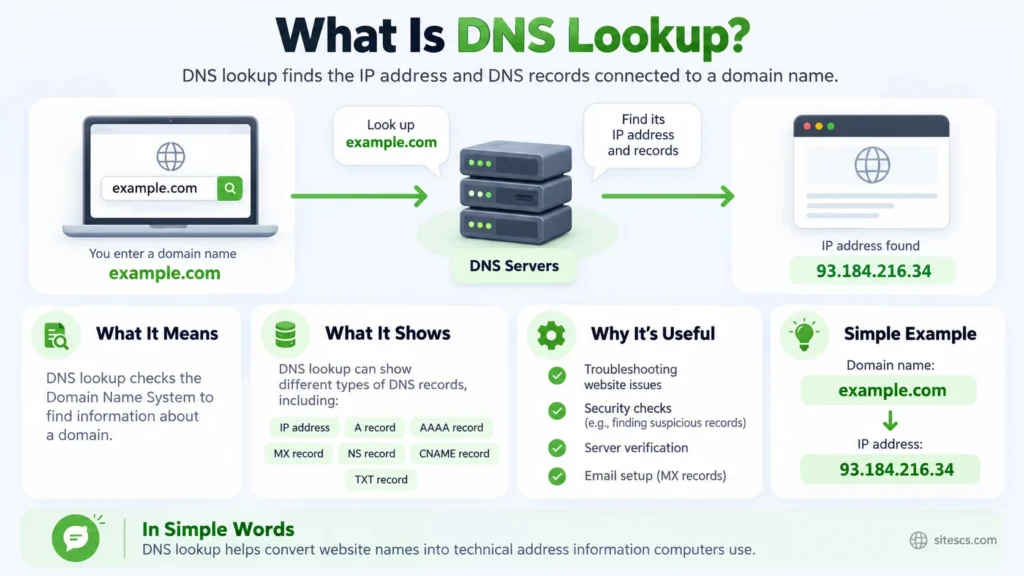
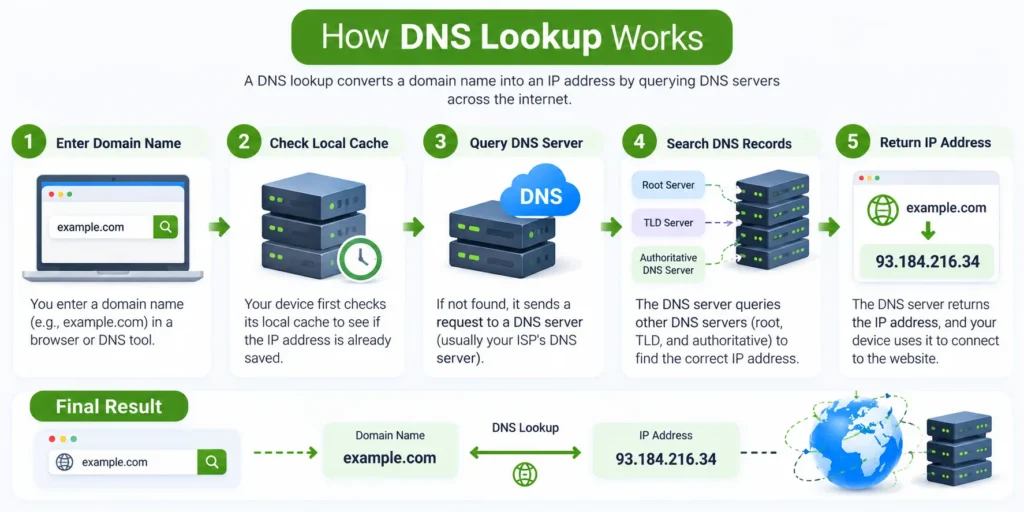
A DNS Lookup lets you see the public DNS records connected to a domain name. When you type a website address such as sitescs.com into your browser, your device needs to discover where that domain should go. DNS provides the information needed to make that connection.
Think of DNS as the directory behind a domain name. Instead of remembering a server IP address, people can use an easy-to-read domain. The DNS system then connects that name with the correct server, mail service, verification record, or other destination.
Our DNS Lookup tool checks several common DNS records at once, so you can quickly understand how a domain is configured.
What Information Can a DNS Lookup Show?
A domain can have many different DNS records, and each one has a different job.
An A record connects a domain to an IPv4 address, while an AAAA record connects it to an IPv6 address.
An MX record tells other mail servers where email for the domain should be delivered.
An NS record identifies the nameservers responsible for managing the domain’s DNS.
You may also see TXT records. These can contain verification information, email-related settings, and other text-based data used by different services.
A CNAME record points one hostname to another hostname instead of directly to an IP address.
The tool may also return CAA and SOA records, which provide additional information about certificate authorization and DNS administration.
Why Would You Check DNS Records?
DNS Lookup is especially useful when you are setting up a website or making changes to a domain.
For example, imagine you have just moved your website to a new hosting provider. You changed the DNS settings, but the site still appears to be loading from the old server. Checking the A record can help you see which IP address is currently being returned.
The same idea applies to email. If email suddenly stops arriving after changing your domain settings, checking the MX records can help confirm whether the domain still points to the correct mail servers.
It is a simple check, but it can quickly tell you whether you are looking in the right place.
What Does TTL Mean?
You will often see TTL next to a DNS record.
TTL stands for Time to Live.
It tells DNS resolvers how long they are allowed to keep a copy of that record before asking for an updated version.
For example, if a record has a TTL of 300 seconds, another DNS server may keep that result cached for about five minutes before checking again.
This is one reason DNS changes do not always appear everywhere immediately.
Why Do DNS Results Sometimes Change?
DNS results are not always permanent.
A website owner may change hosting providers, update mail services, enable IPv6, move to another CDN, or change DNS providers.
Large websites can also return different records depending on how their infrastructure is configured.
So, if you perform the same DNS lookup at two different times, you may occasionally see different IP addresses, TTL values, or other record information.
That does not automatically mean something is wrong.
Why Am I Seeing Several A or AAAA Records?
A domain can point to more than one IP address.
This is common for websites that use multiple servers, cloud infrastructure, load balancing, or content delivery networks.
Instead of depending on one server, traffic can be distributed across several systems.
This can improve availability and help a website continue working even if one server experiences a problem.
So, seeing multiple A or AAAA records is often completely normal.
Can DNS Lookup Help When a Website Is Down?
It can help with the investigation.
Suppose your website suddenly stops opening. A DNS lookup can tell you whether the domain is still returning an IP address.
If there is no A or AAAA record when one should exist, DNS configuration could be part of the problem.
If the correct IP address appears, you can start checking other possibilities, such as the hosting server, SSL certificate, firewall, application, or network connection.
DNS Lookup does not diagnose every website problem, but it is a very useful first check.