How AI Prompts Work? Explained
I still remember the first time I typed a question into a Large Language Model (LLM). Like many, I treated it like a Google search engine. The result? A generic, uninspired wall of text. It took me months of daily experimentation to realize a fundamental truth: AI doesn’t give you what you want; it gives you exactly what you ask for.
Welcome to the world of prompt engineering. If you want to understand how AI prompts work, you are in the right place. As an AI strategist, I spend my days building workflows, optimizing LLMs, and helping businesses stop fighting with their AI tools and start directing them.
Today, we will break down the mechanics behind AI prompts. We will explore how these systems interpret your words, why certain structures fail, and how you can master prompt engineering to unlock the true potential of generative AI.
What Are AI Prompts? A Beginner-Friendly Explanation
At its core, an AI prompt is simply the instruction you give to an Artificial Intelligence model. It is the bridge between human intent and machine output.
When you type a prompt into a tool like ChatGPT, Claude, or Gemini, you are not talking to a sentient being. You are interacting with a complex mathematical engine trained on vast amounts of data. This engine uses natural language processing (NLP) to predict the most logical sequence of words to follow your input.
Think of an LLM as a highly skilled, literal-minded intern. If you say, “Write a marketing email,” the intern grabs the most generic template available. If you say, “Write a 200-word marketing email to small business owners highlighting our new accounting software, adopting a professional but urgent tone,” the intern knows exactly what to do. The difference between those two outcomes is prompt engineering.
The Hierarchy of AI Prompts: From Basic to Advanced
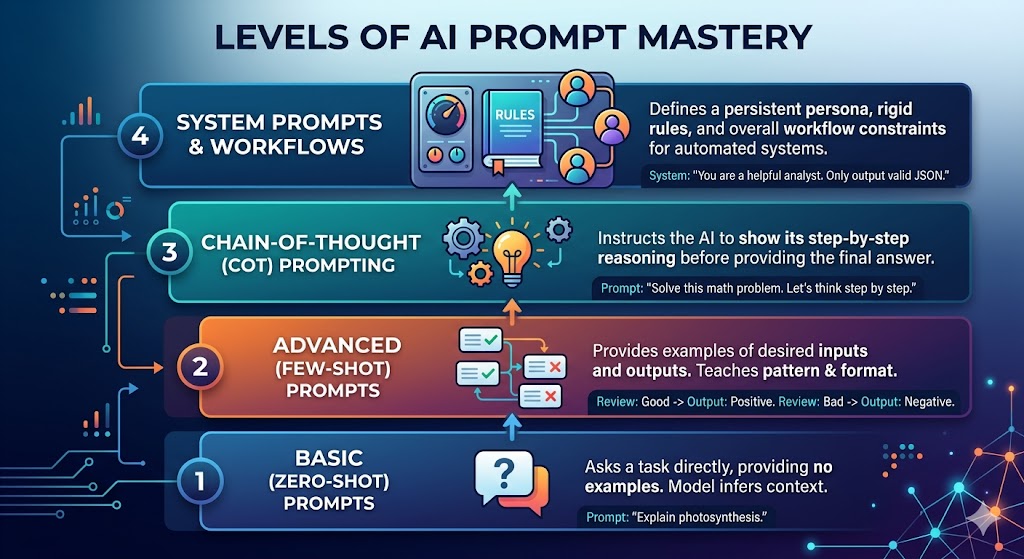
Not all prompts are created equal. As you grow more comfortable with generative AI, you naturally move up the hierarchy of complexity.
Basic Prompts (Zero-Shot)
A zero-shot prompt asks the AI to perform a task without providing any examples.
- Example: “Explain the concept of quantum computing.” These work well for general knowledge, but they leave the formatting and tone entirely up to the model’s default settings.
Advanced Prompts (Few-Shot)
Few-shot prompting involves giving the AI examples of the desired output within the prompt itself. By showing the model what you want, you drastically reduce hallucinations and format errors.
- Example:
“Classify the sentiment of the following reviews. Review: ‘The service was terrible.’ Sentiment: Negative. Review: ‘I absolutely love this product!’ Sentiment: Positive. Review: ‘The delivery was late, but the item is okay.’ Sentiment: ?”
Chain-of-Thought Prompting
When dealing with complex logic or math, you must force the AI to show its work. Chain-of-thought prompting asks the model to break down its reasoning step by step before delivering the final answer. You simply append “Let’s think step by step” to your instruction.
System Prompts and Workflows
System prompts act as the underlying operating instructions for an AI session. Instead of giving one-off commands, you define a persona and a rigid set of rules. For example, “You are a senior python developer. You only output valid, commented code. You never apologize.” Developers use system prompts to build automated workflows and autonomous agents.
Step-by-Step Prompt Writing Guidance: The Dos and Don’ts
Writing effective AI prompts is a skill you build through repetition. To shorten your learning curve, I use a framework that focuses on context, constraints, and clarity.
The Dos
- Do provide a persona: Tell the AI who it is. “Act as a seasoned SEO writer.”
- Do set clear constraints: Specify word counts, formatting (JSON, markdown, tables), and reading levels.
- Do use delimiters: Use quotes, XML tags, or brackets to separate your instructions from your source text.
- Do iterate: If the first output fails, tweak your instructions instead of starting over.
The Don’ts
- Don’t use ambiguous language: Avoid words like “better” or “creative.” Instead, ask for “more descriptive adjectives” or “a humorous tone.”
- Don’t overload a single prompt: If you need an article written, an image generated, and a social post drafted, break those into three separate prompts.
- Don’t be polite: Saying “please” and “thank you” wastes tokens. The AI does not care about manners. Be direct.
Real-World Applications: Prompt Engineering in Action
Let’s look at how professionals actually use these concepts across different industries.
Marketing and Content Creation
Marketers no longer use AI just to write blog posts. They use it to analyze customer sentiment and generate A/B test variations.
- Effective Prompt: “Analyze the attached customer survey data. Extract the top three recurring pain points and draft a Facebook ad headline addressing each pain point.”
Coding and Development
Software engineers use LLMs as pair programmers. They don’t ask the AI to “build an app.” They ask it to debug specific functions.
- Effective Prompt: “Review the following Python script. Identify why the database connection is timing out. Provide the corrected code block and explain the fix in one sentence.”
Business and Productivity
Executives use AI to summarize dense reports and draft standard operating procedures.
- Effective Prompt: “Summarize the attached quarterly earnings report. Create a bulleted list of the key revenue drivers, followed by a table comparing Q3 to Q4 expenses.”
Education
Teachers utilize AI to create customized lesson plans or generate practice questions tailored to specific learning disabilities.
- Effective Prompt: “Act as a high school biology teacher. Explain cellular respiration to a student with ADHD. Use short sentences, bold key terms, and include a real-world analogy.”
Personal Insights from the AI Trenches
I have spent hundreds of hours staring at a blinking cursor in various AI interfaces. If I could impart one piece of wisdom, it is this: Treat AI as a reasoning engine, not a knowledge database.
LLMs are incredible at manipulating text, synthesizing concepts, and mimicking styles. They are terrible at memorizing raw facts. When I write a technical article, I don’t ask the AI to generate the facts. I provide my own outline, my own research, and my own data, and I ask the AI to structure and polish it. This hybrid approach keeps the human in the loop and ensures the final product reflects genuine expertise.
Common Mistakes and How to Fix Them
Even experienced users fall into traps. Here are the most common pitfalls I see.
Mistake 1: The “Guess What I’m Thinking” Prompt
You ask for a “good” article, and the AI delivers something generic.
- Fix: Define “good.” Specify the tone, the target audience, and the required sections.
Mistake 2: Ignoring Output Formatting
The AI provides a wall of text that takes 20 minutes to read.
- Fix: Explicitly demand structure. “Format your response as a table with three columns: Concept, Definition, and Example.”
Mistake 3: The Hallucination Trap
You ask for historical dates, and the AI invents them.
- Fix: Add a grounding constraint. “If you do not know the answer based on the provided text, reply with ‘Information not found.'”
When AI Should NOT Be Trusted Completely
We must discuss the limitations. Generative AI is powerful, but it is not infallible. You should never trust an LLM completely in the following scenarios:
- Factual Research: Models hallucinate. Always verify statistics, historical dates, and legal citations using trusted sources like Google Scholar, Gartner, or direct peer-reviewed papers.
- Medical or Legal Advice: AI lacks the specialized nuance and liability required to diagnose an illness or draft a binding contract.
- High-Stakes Math: While models improve daily, language models still struggle with complex arithmetic. Always verify calculations.
AI Myths and Misconceptions
The media often portrays AI through a lens of extreme hype or extreme doom. Let’s clear up some myths.
Myth: AI Will Replace All Writers and Coders
Reality: AI will replace writers and coders who refuse to use AI. The technology lowers the barrier to entry, but it elevates the ceiling for those who master it. It automates the mundane, freeing humans to focus on strategy.
Myth: You Need to Be a Programmer to Write Prompts
Reality: Prompt engineering is a communication skill, not a coding skill. If you can write a clear email to a colleague, you can write an effective prompt.
Myth: The Bigger the Prompt, the Better
Reality: Bloated prompts confuse the model. Clarity and structure matter far more than raw word count.
The Future of AI and Prompt Engineering
Where is this heading? According to research from organizations like OpenAI and Microsoft, the future of prompt engineering is moving toward autonomous agents.
We are shifting from single-turn prompts (“Write an email”) to multi-agent workflows (“Agent A researches the topic, Agent B drafts the email, Agent C edits for brand voice”).
Furthermore, prompt engineering itself is becoming automated. We are seeing the rise of “meta-prompts,” where you ask an LLM to generate the perfect prompt for another LLM. As models gain larger context windows—capable of ingesting entire books at once—the focus will shift from managing constraints to curating massive datasets for the AI to analyze.
Try This Prompt Yourself: The Interactive Sandbox
Reading about prompts is one thing; building them is another. To help you grasp how minor tweaks change AI behavior, I’ve set up an interactive Prompt Playground below.
Use this sandbox to adjust parameters like persona, constraints, and tasks, and watch how the output instructions shift in real time.
Prompt Engineering Playground
| Structure | Instruction Detail |
|---|---|
| 👤 Persona | SEO Writer |
| 🎯 Task | Write a summary |
| 🛠️ Constraint | Max 100 words |
| ✨ Final Prompt | Act as a SEO Writer. Your task is to write a summary. Please ensure you max 100 words. |
How This Article Was Created
Transparency matters, especially when discussing Artificial Intelligence. As an AI strategist, I utilize a hybrid workflow to produce content.
I generated the structure, outline, and core insights based on my personal experience building AI workflows. I utilized an advanced Language Model to help format the markdown, correct pacing, and ensure a natural transition between headings while maintaining my specific voice parameters. The final editing, fact-checking against current industry standards, and structural refinement were completed manually by me. This process perfectly illustrates my core philosophy: use AI to amplify human expertise, never to replace it.
By understanding how AI prompts work, you stop treating these tools as search engines and start treating them as collaborators. The true power of generative AI belongs to those who learn how to ask the right questions. Keep experimenting, stay curious, and refine your instructions. The results will follow.


