HTTP Header Checker
Check HTTP response headers, status code, server information, caching and security headers.
Header results can vary by request method, CDN, location, cookies and server configuration.
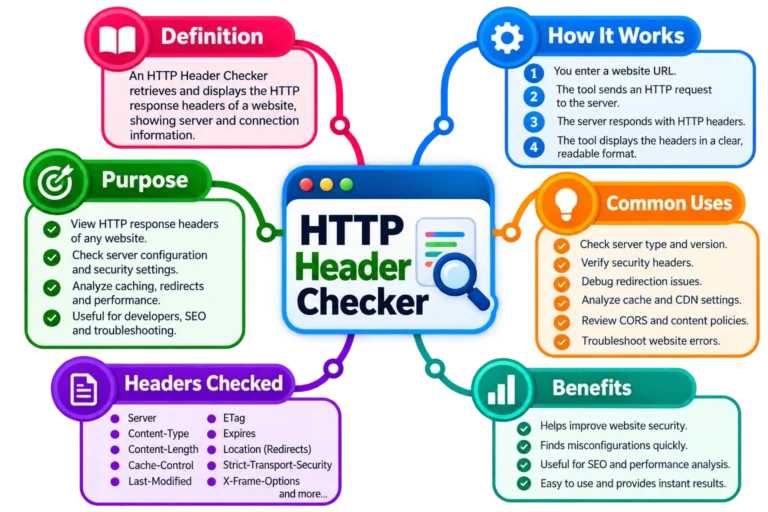
How HTTP Header Checker Works
An HTTP Header Checker shows the response headers a website sends back when a request reaches its server. These headers contain useful technical information about the website, such as its HTTP status, content type, caching rules, redirects, server details, compression, and security policies.
Enter a domain or full URL, such as example.com or https://example.com/page, and start the check. The SITESCS tool sends a request to that address, receives the server response, and organizes the returned HTTP headers so they’re easier to understand.
You don’t need to install anything. The important difference, however, is that this check is performed through the SITESCS server because normal browser JavaScript cannot reliably read every response header from an unrelated website due to browser security restrictions.
What Are HTTP Headers?
HTTP headers are small pieces of information exchanged between a web browser, application, CDN, proxy, and web server during an HTTP request and response.
They don’t normally contain the visible webpage itself. Instead, they describe how the request or response should be handled—for example, what type of content is being returned, whether it can be cached, whether HTTPS should be enforced, or whether another website is allowed to embed the page.
You can think of the webpage as the package, while HTTP headers are the instructions written on the outside of that package.
Request Headers vs Response Headers
HTTP communication generally involves two sides: request headers and response headers.
Request headers are sent by the browser or client to the server. They can include information such as accepted content types, browser details, cookies, language preferences, and authorization information.
Response headers travel in the opposite direction. The server sends them back to the browser with information about the response. The SITESCS HTTP Header Checker mainly focuses on these response headers.
What Does an HTTP Header Checker Show?
The exact result depends on the website, server, CDN, and configuration, but you may see information such as:
- HTTP status code
- Response time
- Content-Type
- Server
- Cache-Control
- Content-Encoding
- Location
- Date
- Strict-Transport-Security
- Content-Security-Policy
- X-Content-Type-Options
- X-Frame-Options
- Referrer-Policy
- Permissions-Policy
- Cross-Origin-Opener-Policy
- Cross-Origin-Resource-Policy
Some websites return dozens of headers, while others return only a small number. Having more headers does not automatically mean a website is better or more secure—the meaning and configuration of those headers matter much more.
What Is an HTTP Status Code?
An HTTP status code is a three-digit number returned by a web server to describe what happened with a request.
For example, a successful webpage usually returns:
200 OKA redirect might return:
301 Moved Permanentlywhile a page that does not exist may return:
404 Not FoundThe status code is often the first thing to check when troubleshooting whether a page is loading correctly.
Common HTTP Status Codes
Several HTTP status codes appear frequently during website troubleshooting.
200 OK means the request completed successfully.
301 Moved Permanently means the requested resource has permanently moved to another URL.
302 Found usually indicates a temporary redirect.
304 Not Modified tells a client that a cached copy may still be used.
400 Bad Request means the server could not understand the request correctly.
401 Unauthorized normally means authentication is required.
403 Forbidden means the server understood the request but refused access.
404 Not Found means the requested resource could not be found.
429 Too Many Requests usually appears when a server or service is applying a rate limit.
500 Internal Server Error indicates a problem on the server.
502 Bad Gateway, 503 Service Unavailable, and 504 Gateway Timeout often involve upstream servers, proxies, CDNs, or temporary server availability problems.
What Does Content-Type Mean?
The Content-Type header tells the browser what kind of content the server is returning.
A normal HTML webpage may return something similar to:
text/html; charset=UTF-8Other examples include application/json for JSON data, image/png for PNG images, and application/pdf for PDF documents.
If a server sends an incorrect Content-Type, the browser may misunderstand the response or handle the resource incorrectly.
What Is the Server Header?
The Server header may reveal software or infrastructure involved in serving the website.
For example, you might see values related to Nginx, Apache, Cloudflare, LiteSpeed, or another server technology.
However, this value should not be treated as a complete picture of the hosting setup. A CDN or reverse proxy may hide the origin server, and many administrators intentionally remove or simplify the Server header.
Is It Bad If the Server Header Is Hidden?
No. In fact, hiding unnecessary server-version details can reduce the amount of technical information publicly exposed about the website.
A missing Server header does not mean the site has no server. It simply means the response does not reveal that information.
Likewise, seeing a Server header is not automatically dangerous. Security depends on the actual configuration and software maintenance—not simply whether the header exists.
What Is Cache-Control?
The Cache-Control header tells browsers, CDNs, and other caches how a response may be stored and reused.
A header might look like:
Cache-Control: public, max-age=3600This means the response may be cached publicly for a specified period.
Other directives include no-cache, no-store, private, s-maxage, must-revalidate, and several others. Each controls caching behavior differently.
Does “no-cache” Mean Nothing Is Cached?
Not exactly. This is a common misunderstanding.
no-cache generally means a cached response should be validated with the server before being reused. It does not necessarily mean the response cannot be stored at all.
If a response should not be stored in a cache, no-store is the stronger instruction.
What Is Content-Encoding?
The Content-Encoding header tells the client whether the response has been compressed.
Common values include:
gzipand:
brwhere br refers to Brotli compression.
Compression can significantly reduce the amount of data transferred for HTML, CSS, JavaScript, JSON, and other text-based resources.
Why Is Content-Encoding Missing?
A missing Content-Encoding header does not always indicate a problem. Some responses may be very small, already compressed, or unsuitable for additional compression.
The server or CDN may also decide whether compression is appropriate based on the specific request.
So, this header should be interpreted together with the type of resource being tested.
What Is the Location Header?
The Location header is commonly used during redirects.
For example, if:
http://example.comredirects to:
https://example.comthe response may contain a Location header pointing to the HTTPS address.
It is useful when troubleshooting redirect chains, HTTPS migrations, domain changes, www redirects, or pages that unexpectedly send visitors elsewhere.
Why Does My Website Redirect?
Websites can redirect for many legitimate reasons. A common example is automatically moving visitors from HTTP to HTTPS.
Other redirects may add or remove www, send an old page to a new URL, enforce a preferred trailing-slash format, redirect mobile users, or route visitors through authentication.
A redirect becomes a problem when it points to the wrong page, creates an endless loop, or adds unnecessary redirect steps.
What Is the Date Header?
The Date response header normally shows when the server generated or sent the HTTP response.
It is expressed using a standardized time format, usually GMT/UTC.
This value can help with debugging caching, proxies, authentication, and time-sensitive responses, although it should not be confused with the last time the webpage itself was edited.
What Are HTTP Security Headers?
HTTP security headers give the browser instructions intended to reduce certain web-security risks.
They can help control whether a website may be embedded inside another site, whether browsers should force HTTPS, which external resources may load, how much referrer information should be shared, and which browser capabilities a page may use.
Security headers are important—but simply adding every possible header is not the goal. Each one should be configured correctly for the website.
What Is Strict-Transport-Security?
Strict-Transport-Security, usually called HSTS, tells a browser to use HTTPS when communicating with a website.
A typical header might look similar to:
Strict-Transport-Security: max-age=31536000Once the browser accepts the policy, it can automatically prefer HTTPS for future visits during the specified period.
HSTS should be configured carefully because a long policy can affect access to the domain if HTTPS later becomes misconfigured.
Why Is HSTS Important?
HTTPS protects traffic between the visitor and the website using encryption. HSTS adds another layer by telling supporting browsers that the site should only be accessed over HTTPS.
This can help reduce certain downgrade or accidental HTTP-access scenarios.
However, a website should already have a properly configured HTTPS certificate before enabling an aggressive HSTS policy.
What Is Content-Security-Policy?
Content-Security-Policy, commonly shortened to CSP, is one of the most powerful browser security headers.
It can control which sources are allowed to provide scripts, stylesheets, images, fonts, frames, connections, and other resources.
For example, a restrictive CSP can reduce the impact of certain cross-site scripting attacks by limiting where scripts are allowed to come from.
Why Can CSP Break a Website?
Because CSP controls which resources are allowed to load, an incorrect policy can accidentally block legitimate scripts, fonts, analytics, advertisements, images, or third-party services.
This is why CSP should be tested carefully before enforcing a strict policy.
Developers can also use reporting or report-only configurations while building and testing a policy.
What Is X-Content-Type-Options?
The X-Content-Type-Options header is commonly configured as:
X-Content-Type-Options: nosniffIt tells supporting browsers not to guess a different content type from the one declared by the server.
This can help reduce security problems caused by browsers interpreting a resource as something different from what the server intended.
What Is X-Frame-Options?
X-Frame-Options controls whether a webpage may be displayed inside an HTML frame or iframe.
Common values include:
DENYand:
SAMEORIGINThis can help protect against certain clickjacking attacks, where a malicious website places another website inside a hidden or deceptive frame.
Modern sites may also control framing through CSP’s frame-ancestors directive.
What Is Referrer-Policy?
When a visitor follows a link, the browser may send information about the page they came from. The Referrer-Policy header controls how much of that information is shared.
Possible policies can limit referrer information across different domains, HTTPS-to-HTTP transitions, or all requests.
This gives website owners more control over privacy and information leakage while still allowing useful referral information where appropriate.
What Is Permissions-Policy?
Permissions-Policy allows a website to control access to selected browser capabilities.
Depending on browser support and configuration, it may be used to restrict features such as the camera, microphone, geolocation, fullscreen, or other browser APIs.
This can be particularly useful when pages contain third-party frames or embedded content.
What Is Cross-Origin-Opener-Policy?
Cross-Origin-Opener-Policy, or COOP, helps control how a page interacts with other browsing contexts opened from different origins.
It can strengthen isolation between websites and is relevant to certain advanced security features.
Not every ordinary website needs the same COOP configuration, so its absence alone should not automatically be treated as a serious security failure.
What Is Cross-Origin-Resource-Policy?
Cross-Origin-Resource-Policy, or CORP, allows a server to control whether its resources may be loaded from other origins.
This can help protect certain resources from being included by unrelated websites.
Like other cross-origin policies, it should be configured with care because an overly strict value can prevent legitimate integrations from working.
Is CORS an HTTP Header?
CORS—Cross-Origin Resource Sharing—is implemented using HTTP response headers.
Common CORS headers include:
Access-Control-Allow-Origin
Access-Control-Allow-Methods
Access-Control-Allow-Headers
These tell browsers whether scripts from another origin are allowed to access a resource.
CORS does not control whether a webpage can simply link to another site. It mainly affects programmatic cross-origin requests made by browser JavaScript.
Why Does CORS Block Some Header Checkers?
A browser normally prevents JavaScript on one website from freely reading responses from unrelated websites unless the destination explicitly allows it through CORS.
For example, JavaScript running on sitescs.com cannot automatically read every header returned by another random domain.
That is why a serious HTTP Header Checker usually performs the request on the server side and then safely returns the relevant results to the visitor.
What Is an HTTP HEAD Request?
A HEAD request is similar to a normal GET request, except the server is asked to return the headers without sending the complete response body.
This can make it useful for checking headers because less data needs to be transferred.
However, not every server handles HEAD correctly. Some websites block it, return different results, or do not support it at all.
HEAD vs GET: Can the Headers Be Different?
Yes. Although HEAD is designed to provide headers similar to GET, real-world server configurations are not always identical.
A CDN, firewall, application, or server may treat HEAD and GET differently.
That is why the SITESCS checker can fall back to a limited GET request when a server does not support HEAD.
What Is Response Time?
Response time shows approximately how long the HTTP header check took from the SITESCS server.
A lower response time usually means the remote server answered quickly, while a high result may be caused by network distance, DNS resolution, TLS negotiation, redirects, server load, or the destination website itself.
It is important to understand that this is not your personal browser latency. The request originates from the SITESCS server.