Are you starting a new business and need a logo fast? You are not alone! In 2026, over 40% of small businesses use AI logo generator tools to build their brand identity. Whether you are a total beginner or a pro looking for a quick draft, these tools can save you tons of time and money!
In this guide, we will look at the 10 best options available today. Let’s help you find the perfect look for your brand!
AI Logo Maker vs. Professional Designer: The Quick Comparison
What is an AI Logo Generator?
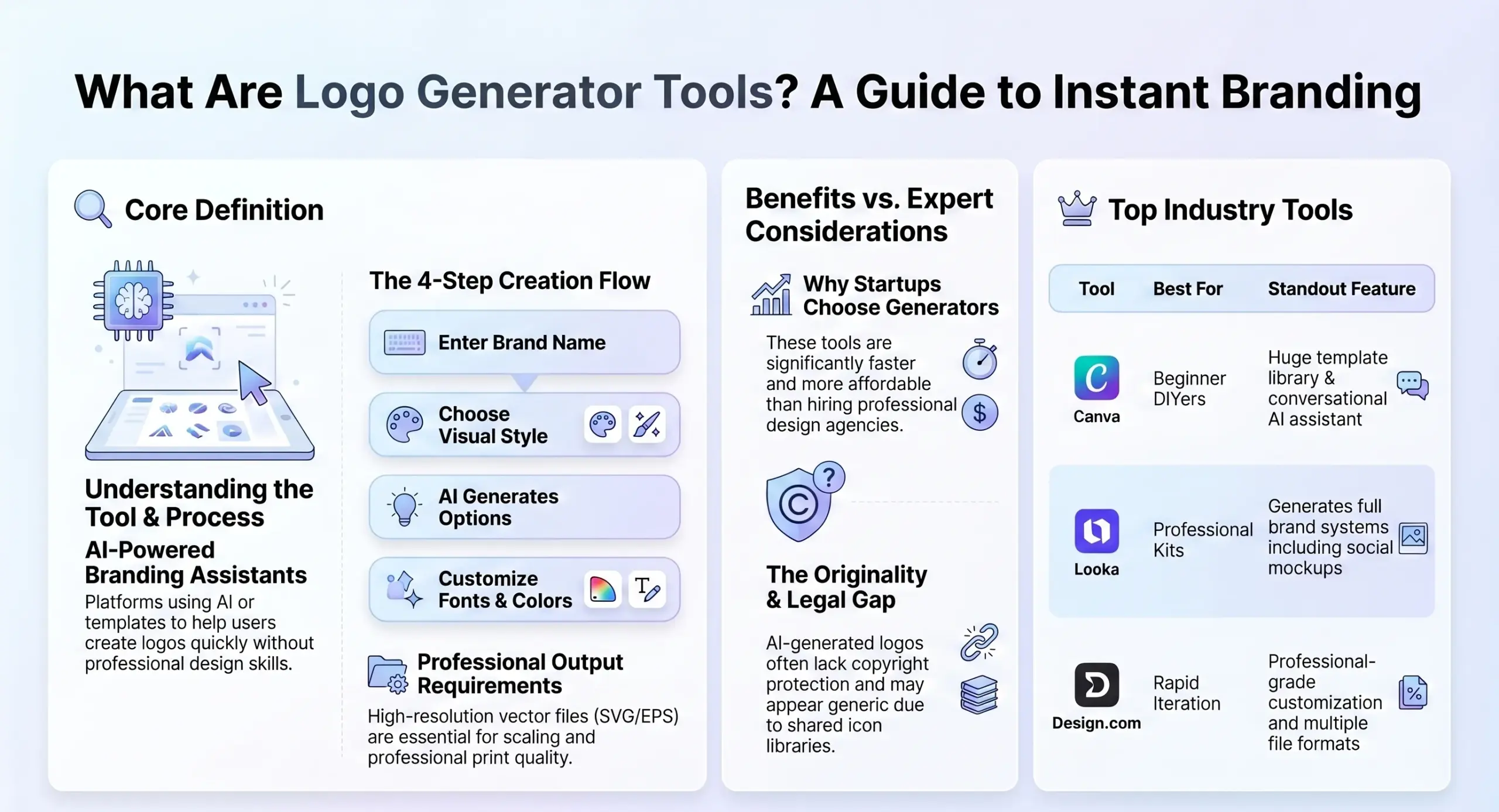
An AI logo generator is a smart tool that uses deep learning and computer vision to create high-quality logos in seconds. Instead of drawing everything by hand, the system analyzes design elements like colors, fonts, and patterns to build a unique logo based on your brand name and industry.
| Feature | AI Logo Generator Tools | Professional Designer |
|---|---|---|
| Speed | Instant (minutes) | Weeks |
| Cost | Free to ~$200 | $300 to $2,500+ |
| Process | Questionnaire or prompts | Strategy, research, and intuition |
| Legal | Hard to copyright | Full copyright ownership |
| Best For | Startups, side projects, testing ideas | Scaled businesses, luxury brands |
1. Looka: The All-in-One Brand Expert
Looka is famous because it does more than just make a logo; it gives you a full “brand kit”. It starts by asking about your industry and style preferences.
- Why it’s great: It creates clean, professional logos and sets up your social media profiles, business cards, and even email signatures automatically.
- Pros: Very easy to use for non-designers and provides high-quality vector files.
- Cons: It can be expensive for a one-time download (20–65).
2. Canva: The King of DIY Design
Most people already love Canva for social media, but its AI logo generator is a powerhouse for beginners.
- Why it’s great: You can type in a simple prompt (like “Futuristic tech logo with a drone icon”) and see ideas instantly.
- Pros: It has a massive library of templates and a great free version.
- Cons: You need a paid “Pro” plan to download logos with a transparent background or in SVG format.
3. Design.com: Professional Branding Made Simple
Design.com is a favorite for startups because it is incredibly fast and produces very modern designs.
- Why it’s great: You just enter your business name and keywords, and it handles the rest. You can even add animations to your logo for your website!
- Pros: It offers a complete creative toolkit including flyers and social posts.
- Cons: You have to pay to download the high-quality files you actually need for printing.
4. BrandCrowd: The Template Titan
If you want to choose from a huge library of ready-made ideas, BrandCrowd is for you.
- Why it’s great: It has thousands of exclusive templates across every industry imaginable.
- Pros: It supports layer-based editing, which is great for people who want more control.
- Cons: Some logos can look a bit generic if you don’t customize them well.
5. Wix Logo Maker: Best for Website Owners
If you are already building a website on Wix, their logo maker is the most convenient choice.
- Why it’s great: It asks a few questions about your “vibe” and generates designs that match your website’s style.
- Pros: Seamless integration with your site and very intuitive.
- Cons: It is mainly designed to keep you inside the Wix ecosystem.
6. Logo.com: The Speed Demon
Logo.com focuses on getting you a professional logo with zero stress.
- Why it’s great: It uses AI to suggest designs based on simple business details.
- Pros: It is very user-friendly and offers affordable one-time purchases.
- Cons: Some users find it hard to make major changes to the logo after buying it.
7. OneMinuteBranding: The Developer’s Best Friend
This tool is unique because it doesn’t just give you a picture; it gives you code!
- Why it’s great: It generates a logo plus a full color palette and “Tailwind” code that developers can paste right into their apps.
- Pros: One-time payment ($49) and very high-tech features for SaaS founders.
- Cons: Not the best choice if you mainly need a logo for physical products or print.
8. Brandmark: The Creative Mark Maker
Brandmark is known for creating original shapes and symbols instead of just using standard icons.
- Why it’s great: It uses “theme vectors” to make sure your logo feels like a real brand, not a cartoon.
- Pros: High-quality unique concepts and a one-time fee.
- Cons: The quality can be hit-or-miss, so you might need to try a few times.
9. LogoAI: The Visual Specialist
LogoAI is perfect if you want to see exactly how your logo will look in the real world.
- Why it’s great: It has amazing “mockup” tools that show your logo on business cards, signs, and merchandise.
- Pros: Exceptional visualization and professional file exports.
- Cons: There is no free option; you have to pay to get any usable files.
10. Hatchful by Shopify: The Budget Hero
If you have zero dollars to spend, Hatchful is your best bet!
- Why it’s great: It is a completely free tool created by Shopify for new entrepreneurs.
- Pros: Totally free and incredibly fast to use.
- Cons: The designs are very simple and you might see other brands with similar logos.
Important: The “Copyright Bombshell” You Need to Know!
Before you fall in love with your new AI logo, we have to talk about the law! This is very important for your business!
- You Might Not Own It: Under many laws, only things made by humans can have copyright. This means an AI logo generator output might be “public domain” — anyone could technically copy it!.
- Trademark is Different: You can often trademark an AI logo if you use it in business and it is distinctive. But if the AI used a common icon, your application might be rejected.
- The Fix: Many experts suggest using AI for ideas, then having a human designer “redraw” or “tweak” the logo so it becomes a legally protectable asset.
Pro Tips for the Best AI Logo Results!
To get a logo you actually love, follow these simple tips:
Simple is Better: Memorable logos are usually simple. Don’t let the AI make it too messy!
Be Specific with Prompts: Don’t just say “Coffee logo.” Say “Minimalist flat vector logo for a coffee shop, earthy tones, no shadows, white background”.
Always Get a Vector (SVG) File: PNGs get blurry when you make them big. An SVG stays sharp on everything from a tiny business card to a giant billboard!.
Check for Transparency: Make sure you can download a version with a “transparent background” so it looks good on your website.