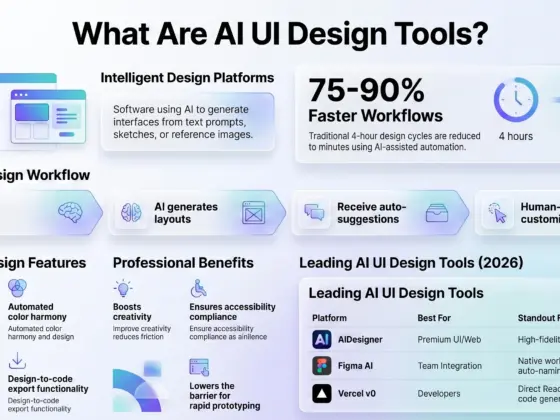
Are you tired of spending hours trying to create one simple social media post? Or maybe you are a professional designer who needs to speed up your workflow? You are in luck! The AI graphic design tools market has exploded recently. In 2026, these tools are not just for fun experiments; they are essential for anyone who wants to stay ahead!
Whether you are a complete beginner or a seasoned pro, there is an AI tool waiting to change your life! Let’s explore the 15 best options available right now!
What are AI Graphic Design Tools?
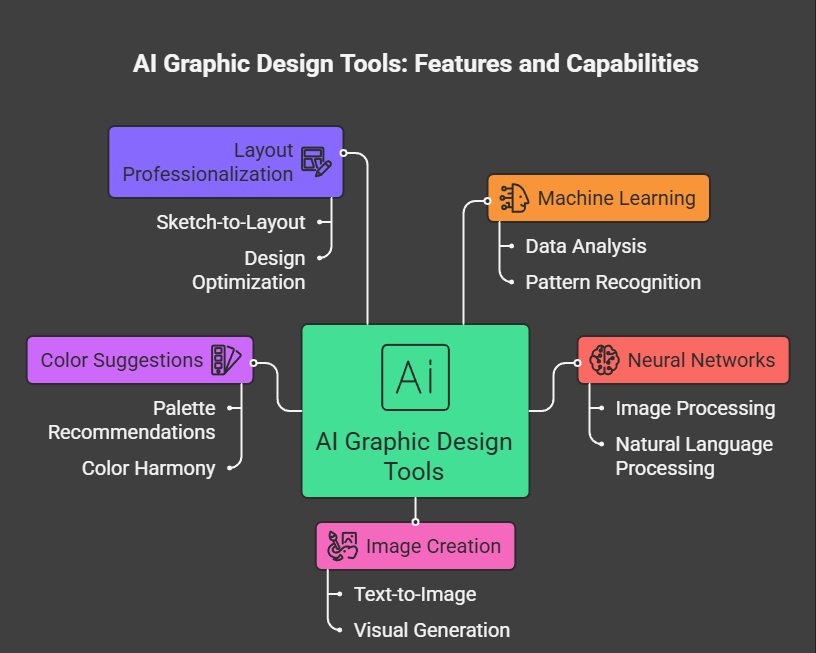
These are software apps that use smart technology like “machine learning” and “neural networks” to help you with visual tasks. They can create images from just a few words, suggest colors, or even turn a rough sketch into a professional layout.
AI Design Generators vs. AI-Assisted Design Tools: “Generators” like Midjourney create images from scratch based on your text. “Assisted” tools like Canva take your existing work and make it better with smart features like one-click background removal.
Vector vs. Raster: This is important! Raster images (like those from Midjourney) are made of pixels and can get blurry if you stretch them. Vector images (like those from Recraft) use math to stay perfectly sharp at any size—perfect for logos!
Quick Comparison of Top Tools
| Tool | Best For | Free Plan? | Standout Feature |
|---|---|---|---|
| Canva | Beginners & Social Media | Yes | Magic Design (Text-to-Design) |
| Figma | UI/UX & App Teams | Yes | Figma Make & Dev Mode |
| Adobe Firefly | Professionals & Brands | Yes | Commercially Safe Outputs |
| Midjourney | High-Quality Art | No | Best-in-class Image Quality |
| Recraft | Logos & Icons | Yes | Native SVG (Vector) Output |
1. Canva (Magic Studio)
Canva is easily the most popular tool for people who are not professional designers. Its “Magic Studio” is packed with over 20 AI features that make design feel like magic!
- Key Strengths: You can use Magic Design to turn a short text prompt into a full, editable presentation or social post in seconds! The new Magic Layers feature even lets you take a flat image and break it into editable pieces.
- Best For: Small business owners, social media managers, and students.
- Pricing: Great free plan; Pro starts at ~$13/month.
2. Figma (Figma AI & Figma Make)
If you are building an app or a website, Figma is the industry standard. Their new AI features, like Figma Make, allow you to describe a design in plain English and see it appear on your screen!
- Key Strengths: It bridges the gap between design and development with Dev Mode, which turns your designs into code. It also has a Visual Search that helps you find components just by uploading a screenshot.
- Best For: UI/UX designers and product teams.
- Pricing: Free plan for individuals; Professional starts at ~$15/editor/month.
3. Adobe Firefly
Adobe Firefly is the safe choice for big companies. Why? Because it is trained only on licensed content and public domain images. This means you don’t have to worry about legal issues!
- Key Strengths: It is built directly into Photoshop and Illustrator. You can use Generative Fill to add or remove objects from a photo just by typing! It also has a “Generative Recolor” tool that changes the colors of your vector art instantly.
- Best For: Professional agencies and designers already using Adobe.
- Pricing: Free limited credits; included in Creative Cloud (~$55/month).
4. Midjourney
When it comes to pure beauty, Midjourney is the king! It produces the most stunning, artistic images of any AI tool in 2026.
- Key Strengths: It is amazing at nailing mood, lighting, and composition. It now has a dedicated website, so you no longer have to use Discord if you don’t want to!
- Best For: Concept art, mood boards, and high-end marketing visuals.
- Pricing: No free tier; plans start at ~$10/month.
5. Microsoft Designer
If you already use Word or PowerPoint, you might already have this tool! Microsoft Designer is free for anyone with a Microsoft account and is powered by DALL-E.
- Key Strengths: It is very simple to use for quick graphics and social posts. It integrates perfectly with the rest of the Microsoft 365 suite.
- Best For: Office workers and students who need quick, clean visuals.
- Pricing: Free! Some extra features come with Microsoft 365 (~$7/month).
6. DALL-E 3 (via ChatGPT)
DALL-E 3 is made by OpenAI. Its biggest win is how well it understands exactly what you say. You can talk to it like a human through ChatGPT!
- Key Strengths: It is much better at putting readable text inside images than older AI models. You can keep refining your image through a conversation until it is perfect!
- Best For: Quick brainstorming and conceptualizing ideas.
- Pricing: Limited free use; ChatGPT Plus is ~$20/month.
7. Recraft
Recraft is a game-changer for people who need logos. Unlike most AI that gives you “raster” images, Recraft creates native vector graphics (SVG).
- Key Strengths: You can edit the paths and colors of the icons it generates in tools like Illustrator. It also has a Brand Consistency Engine that learns your style from a few photos.
- Best For: Brand designers and icon creators.
- Pricing: Free daily credits; Pro starts at ~10–12/month.
8. Uizard
Have you ever drawn a rough sketch of an app on a napkin? Uizard can turn that photo into a digital, editable design!
- Key Strengths: Its “Autodesigner” generates full app screens from text prompts. It is extremely beginner-friendly and great for early-stage prototyping.
- Best For: Startup founders and product managers who aren’t designers.
- Pricing: Free plan available; Pro starts at ~$19/month.
9. Kittl
Kittl is an all-in-one platform for graphic design, branding, and even merchandise. It is used by teams at Netflix and Uber!
- Key Strengths: It uses many different AI models, so you can pick the one that fits your style. It is especially good for t-shirt designs, posters, and complex text effects.
- Best For: Freelancers and merchandise designers.
- Pricing: Free trial; Pro starts at ~$15/month.
10. Ideogram
Most AI tools struggle to write words inside images, but Ideogram is the master of typography! It renders text with about 90% accuracy.
- Key Strengths: If you need a poster or a logo with a specific name, this is your best bet. Its Magic Prompt feature also helps expand your simple ideas into detailed instructions.
- Best For: Poster designers and social media creators.
- Pricing: Free limited access; Plus is ~$20/month.
11. Leonardo.ai
Leonardo is more than just an image generator; it is a full creative studio. It offers an “AI Canvas” for editing your creations directly.
- Key Strengths: You can “paint” over parts of an image to change them (in-painting) or expand the edges (outpainting). It also lets you train your own AI models.
- Best For: Game artists and character designers.
- Pricing: 150 free daily tokens; Essential plan is ~$12/month.
12. Framer
Framer is where design meets the real web. You don’t just design a website; you build a live, responsive one using AI.
- Key Strengths: It generates complete websites from a single text prompt, including hosting and SEO tools. The designs look very modern and “polished” right away.
- Best For: Freelancers and startups needing a landing page fast.
- Pricing: Free plan; Basic site starts at ~$5/month.
13. Khroma
Are you struggling to find the right colors for your brand? Khroma is a free AI tool that learns your personal color taste.
- Key Strengths: You pick 50 colors you like, and it generates infinite palettes, gradients, and typography pairings just for you!
- Best For: Designers looking for color inspiration.
- Pricing: Completely Free!.
14. V0 by Vercel
This is a more technical tool, but it is incredible. V0 lets you describe a website component, and it gives you the actual React code to build it!
- Key Strengths: It bridges the gap between “making it look good” and “making it work”. It is a massive time-saver for developers.
- Best For: Frontend developers and technical designers.
- Pricing: Free tier available; Pro is ~$20/month.
15. Stable Diffusion (DreamStudio)
For the “techies” out there, Stable Diffusion is the ultimate tool. It is open-source, which means you can run it on your own computer for free!
- Key Strengths: You have total control over everything, including training the AI on your own specific art style. Features like ControlNet allow you to guide the AI with extreme precision.
- Best For: Advanced users and AI art enthusiasts.
- Pricing: Free for local use; pay-as-you-go on DreamStudio (~$10 for 5,000 images).
How to Choose the Right Tool?
Still confused? Don’t worry! Here is a simple guide to help you decide:
- Need social media posts? Go with Canva or Microsoft Designer.
- Need an app or website mockup? Use Figma or Uizard.
- Need a professional logo? Try Recraft or Kittl.
- Need beautiful art or photos? Midjourney is your best friend.
A Word on Copyright and Ethics
When using AI graphic design tools, always check the “Usage Rights”.
- Adobe Firefly is the safest for commercial work because of its training data.
- Midjourney allows commercial use if you have a paid plan.
- Google Policy Note: Google prefers original, helpful content! While AI can help you create, the “human touch” in strategy and storytelling is still what matters most.
Conclusion
In 2026, AI is your “junior teammate,” not your replacement! These 15 graphic design tools will help you work faster, think bigger, and create visuals you never thought possible! So, what are you waiting for? Pick a tool and start creating something amazing today!