How Internet Speed Test Works
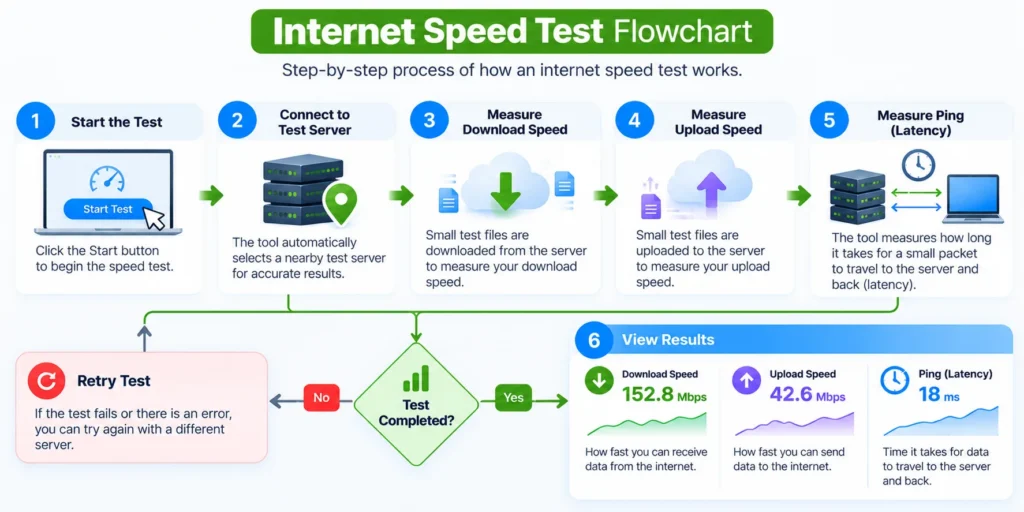
An Internet Speed Test checks how quickly data moves between your device and a test server. The SITESCS tool runs directly in your browser, so the results reflect the connection you’re actually using at that moment.
The test usually begins by checking latency, then measures download speed and upload speed using temporary data transfers. Once the test finishes, you’ll see the main results in Mbps and milliseconds (ms).
Because internet performance can change from one moment to another, the tool runs several measurements instead of relying on a single request. This gives you a more realistic picture of how your connection is behaving.
What Does an Internet Speed Test Measure?
A speed test doesn’t measure just one thing. It looks at several parts of your connection, including download speed, upload speed, ping, jitter, and latency under load.
These numbers tell you different things about your internet connection. Download and upload speeds show how quickly data moves, while ping and jitter tell you how responsive and stable the connection feels.
Looking at all of these measurements together is much more useful than focusing only on the biggest Mbps number.
What Is Download Speed?
Download speed tells you how quickly data can travel from the internet to your device. It affects things like opening websites, streaming videos, downloading files, updating apps, and watching online content.
Download speed is usually measured in megabits per second (Mbps). A higher number means your connection can generally receive more data in the same amount of time.
For example, a 100 Mbps connection can normally download data much faster than a 10 Mbps connection, assuming the website or server can also deliver data at that speed.
What Is Upload Speed?
Upload speed measures how quickly your device can send data to the internet. It matters when uploading files, backing up photos, joining video calls, livestreaming, or sending large attachments.
Many internet plans provide a much higher download speed than upload speed. This is common with residential broadband connections and does not necessarily mean something is wrong.
However, very low upload speed can cause problems during video meetings, cloud backups, livestreams, or large file transfers.
What Is Ping?
Ping is a simple way of describing how long it takes for a request to travel to a server and receive a response. It is normally measured in milliseconds, written as ms.
A lower ping generally means the connection feels more responsive. This is especially noticeable during online gaming, video calls, remote desktop sessions, and other activities where quick responses matter.
For normal browsing and streaming, a slightly higher ping may not be noticeable at all.
What Is Jitter?
Jitter shows how much your latency changes from one request to another. If one request takes 20 ms and the next suddenly takes 100 ms, your connection has more variation than a connection that consistently stays around the same value.
Lower jitter usually means the connection is more stable. High jitter can cause choppy audio, frozen video calls, lag in games, and inconsistent real-time communication.
A connection can have a good average ping but still feel unstable if its jitter is high.
What Is Loaded Latency?
Loaded latency measures how responsive your connection remains while it is actively downloading or uploading data. This is useful because your normal idle ping may look excellent until someone starts using a large amount of bandwidth.
For example, your idle latency might be 20 ms, but it could rise to 150 ms while a large download is running. That increase can make games, calls, and normal browsing feel sluggish.
This is why loaded latency can reveal problems that a basic speed test may miss.
What Does Latency Increase Mean?
Latency increase is the difference between your normal idle latency and the latency measured while your connection is under heavy use. A small increase usually means your connection handles traffic efficiently.
A large increase can indicate congestion or a problem often associated with bufferbloat. In simple terms, your router or network may be holding too much data in queues instead of handling it efficiently.
You may notice this when the internet feels fine until someone starts downloading a large file or uploading videos.
Mbps vs MB/s: What’s the Difference?
Internet providers normally advertise speed in Mbps, which means megabits per second. File downloads are often displayed in MB/s, which means megabytes per second.
There are eight bits in one byte. So, in ideal conditions, a 100 Mbps internet connection has a theoretical maximum of roughly 12.5 MB/s for a file download.
Real download speeds may be lower because of network overhead, server limits, Wi-Fi quality, and other factors.
What Is a Good Internet Speed?
There is no single internet speed that is perfect for everyone. The right speed depends on how many people use the connection and what they do online.
A household that mainly browses websites and watches occasional HD videos needs much less bandwidth than a home with several 4K televisions, gaming systems, cloud backups, and remote workers.
Instead of asking only, “Is my speed good?”, it is better to ask whether the connection is fast and stable enough for the activities you actually use.
How Much Speed Do I Need for Browsing?
Normal web browsing does not require extremely high internet speeds. Even a modest connection can comfortably handle email, news websites, social media, and general browsing.
The experience can still feel slow if latency is high or the Wi-Fi connection is unstable. This is why a connection with a large Mbps number can sometimes feel slower than expected.
For everyday browsing, responsiveness and stability matter almost as much as raw download speed.
How Much Speed Do I Need for HD Streaming?
HD video streaming usually requires only a fraction of the speed offered by many modern broadband plans. A stable connection is often more important than having an extremely high maximum speed.
If several people are streaming at the same time, however, the required bandwidth increases. Other downloads and background updates can also use part of the available connection.
Running a speed test while your network is quiet can help you understand the maximum performance available to you.
How Much Speed Do I Need for 4K Streaming?
4K video requires considerably more bandwidth than HD video because much more visual data needs to be transferred. A stable connection of around a few tens of Mbps is commonly enough for one 4K stream.
If several televisions are streaming 4K content simultaneously, you’ll need more total bandwidth. Wi-Fi quality can also become important, especially when the television is far from the router.
If 4K videos repeatedly buffer even when your speed looks high, check Wi-Fi signal strength and connection stability as well.
What Internet Speed Is Good for Video Calls?
Video calls depend on both download and upload performance. Your device receives video from other participants while simultaneously sending your own camera and audio to them.
This means upload speed is much more important for video calls than it is for normal web browsing. Low latency and low jitter also help keep conversations smooth and natural.
If people frequently tell you that your video freezes or your voice breaks up, check upload speed and jitter rather than looking only at download speed.
What Internet Speed Is Good for Gaming?
Online gaming usually doesn’t require huge amounts of bandwidth. What matters more is ping, jitter, packet stability, and consistency.
A 50 Mbps connection with low latency may provide a better gaming experience than a 500 Mbps connection with unstable ping. Large game downloads benefit from higher Mbps, but actual gameplay often uses relatively little bandwidth.
If your game feels laggy, checking ping and jitter can be more useful than upgrading your speed plan immediately.
Why Is My Internet Speed Slower Than My Plan?
Your internet plan usually describes the maximum or expected connection speed under certain conditions. It does not mean every device will receive that exact speed at all times.
Wi-Fi distance, interference, router limitations, network congestion, device hardware, VPNs, and busy test servers can all reduce the result. Your provider’s network may also be busier during certain times of the day.
A slightly lower result is normal. A consistently much lower result deserves further troubleshooting.
Why Is Wi-Fi Slower Than Ethernet?
Ethernet provides a direct wired connection between your device and router. Wi-Fi has to send data through radio signals, which can be affected by walls, distance, interference, and nearby networks.
Because of this, an Ethernet-connected computer often produces higher and more consistent speed-test results than a device connected over Wi-Fi.
If you want to test the maximum speed being delivered to your home, a wired Ethernet test is usually more reliable.
Does Distance From the Router Affect Speed?
Yes. Wi-Fi signals become weaker as you move farther away from the router. Walls, floors, furniture, and other obstacles can reduce signal strength even further.
A device next to the router may receive excellent speed, while another device several rooms away gets a much lower result. This does not necessarily mean your internet provider is delivering the wrong speed.
Try running the same test close to the router and again from your usual location. The difference can quickly show whether Wi-Fi coverage is part of the problem.
Does a VPN Reduce Internet Speed?
A VPN can reduce speed because your traffic is routed through an additional server and encrypted before reaching its final destination. The amount of slowdown depends on the VPN provider, server location, protocol, and current server load.
A nearby VPN server may have only a small effect, while a distant or overloaded server can noticeably reduce performance and increase latency.
To compare fairly, run one test with the VPN enabled and another with it turned off.
Why Do Speed Test Results Change?
Internet speed is not fixed every second of the day. Network demand, Wi-Fi conditions, background downloads, cloud syncing, server load, and ISP congestion can all cause results to change.
Even two tests performed one minute apart may produce slightly different numbers. Small differences are completely normal and should not be treated as a problem.
For a better comparison, run several tests at different times and look at the overall pattern rather than one result.
Why Is Download Speed Fast but Upload Speed Slow?
Many residential internet plans are asymmetric, which means they provide much more download bandwidth than upload bandwidth. This is common because most home users traditionally download more data than they upload.
For example, an internet plan might offer hundreds of Mbps for downloads but only a much smaller amount for uploads. That can be perfectly normal for the type of service you purchased.
If upload speed is much lower than what your plan promises, check Wi-Fi conditions and test again using Ethernet.
Why Is Ping High Even When Internet Speed Is Fast?
High Mbps does not guarantee low latency. Bandwidth tells you how much data your connection can move, while latency tells you how long each request takes to travel.
You can therefore have a very fast download connection that still has high ping. Long network routes, congestion, VPN use, satellite internet, or distant servers can all increase latency.
This difference is especially important for gaming and video calls, where responsiveness matters more than maximum download capacity.
Why Does My Speed Drop at Night?
Internet connections can slow down during busy hours when many people in the same area are using the network. Evening hours are often busier because more people are streaming, gaming, and downloading content.
The amount of slowdown depends on your provider and the type of internet connection. Some networks handle peak demand much better than others.
Running tests in the morning, afternoon, and evening can help you see whether your performance changes consistently at certain times.
Can My Router Limit Internet Speed?
Yes. An older router may not support the maximum speed of a modern internet plan. Its Ethernet ports, processor, Wi-Fi standard, or wireless radios can all become bottlenecks.
For example, upgrading to a faster broadband plan may not improve Wi-Fi performance much if your router or device still uses older wireless technology.
Before upgrading your internet plan again, check whether your router and devices are capable of handling the speed you already pay for.
Can My Device Affect the Speed Test?
Yes. Older phones, laptops, Wi-Fi adapters, browsers, and processors may not achieve the same speeds as newer hardware.
Background applications can also affect the test. Cloud backups, Windows updates, game downloads, video streaming, and other active programs may use bandwidth while the test is running.
For the cleanest result, close unnecessary downloads and applications before testing.
How to Get a More Accurate Speed Test
Try to keep other internet activity low while running the test. Pause large downloads, cloud backups, software updates, and video streaming on other devices if you want to measure the connection more accurately.
If possible, test using Ethernet first and then compare it with Wi-Fi. Running several tests instead of only one also makes it easier to spot unusual results.
For Wi-Fi troubleshooting, test once next to the router and once from the location where you normally use your device.
Why Do Different Speed Test Websites Show Different Results?
Speed-test services may connect you to different servers, locations, networks, and infrastructure. One server might be physically closer to you than another, resulting in different speed and latency measurements.
The testing method can also differ. Some services use one connection, while others use several connections at the same time to fully load your internet connection.
Because of these differences, you should expect some variation between different speed-test websites.
Does the Speed Test Use My Data?
Yes. Measuring internet speed requires transferring real data. Download testing sends data to your browser, while upload testing sends temporary data from your browser to the test server.
Faster connections generally require transferring more data to produce a meaningful result. For this reason, a complete speed test can use a noticeable amount of mobile data.
If you have a limited mobile-data plan, avoid running repeated tests unnecessarily.
Is Internet Speed Test Safe?
A normal speed test only transfers temporary test data between your browser and a test server. It does not need access to your personal files, passwords, messages, or browsing history.
The purpose of the data transfer is simply to measure how quickly your connection can send and receive information.
As with any online tool, the test should be run over a secure connection and should not request unnecessary personal information.
When Should You Run an Internet Speed Test?
Run a speed test when your internet suddenly feels slow, videos keep buffering, calls become unstable, downloads take longer than expected, or you want to compare your real speed with your internet plan.
It is also useful after installing a new router, changing internet providers, upgrading your plan, moving your router, or switching between Wi-Fi and Ethernet.
For troubleshooting, one test is rarely enough. Run the test a few times and compare the results before deciding where the problem is.
What Should You Do If Your Speed Is Too Slow?
Start by restarting your router and testing again from a device close to it. Check whether other devices are downloading large files or using a lot of bandwidth in the background.
Next, compare Wi-Fi with Ethernet if possible. If Ethernet is fast but Wi-Fi is slow, the issue is probably inside your home network rather than with the internet line itself.
If speeds remain consistently far below your plan even over Ethernet, contact your internet provider with several recent test results and the times when the problem occurred.