IPv4 & IPv6 Checker
See which internet protocols are available on your current connection.
IPv4 & IPv6 Checker
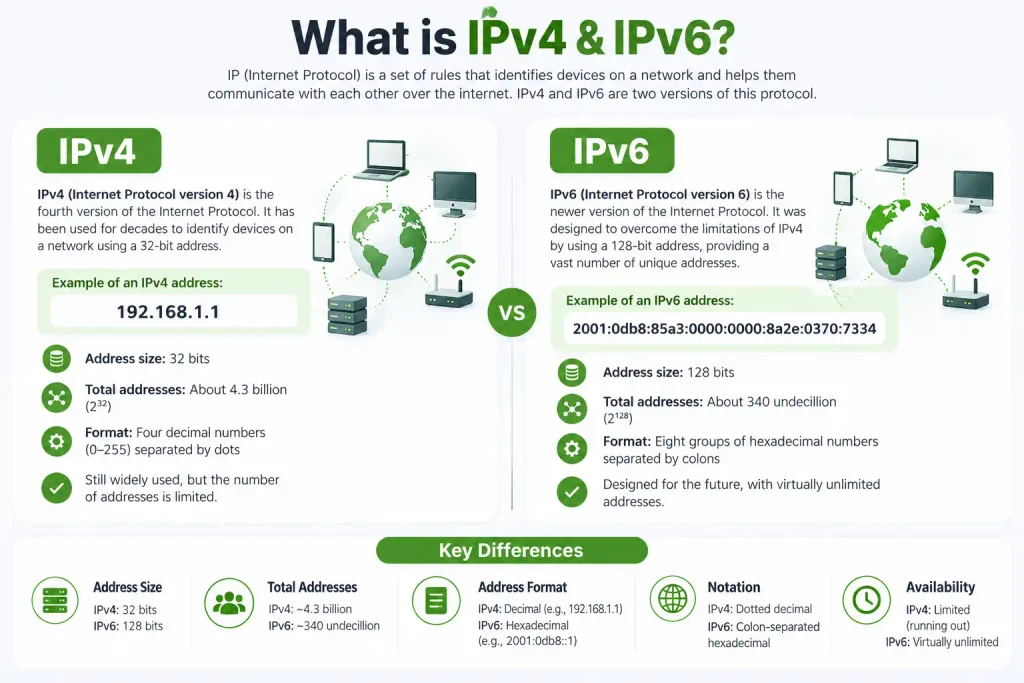
Ever wondered whether your internet connection is using IPv4, IPv6, or both? You’re definitely not alone. Most people use the internet every day without ever checking which IP version their device is actually using — and, honestly, you usually don’t need to think about it.
That’s exactly why this IPv4 & IPv6 Checker is useful.
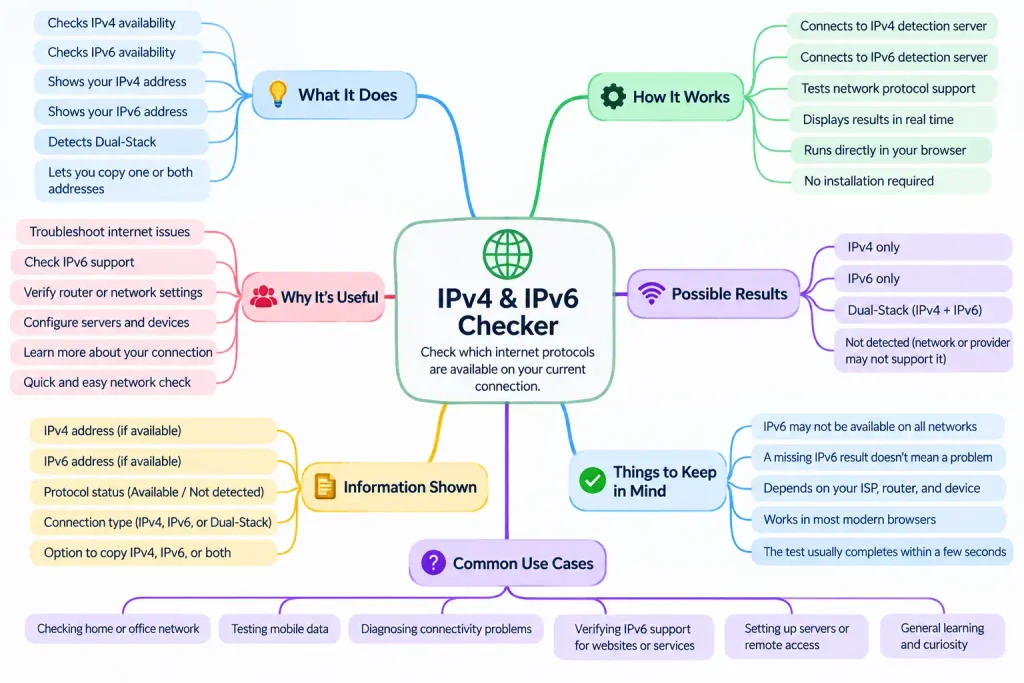
Just open the tool, wait a few seconds, and it will check your current connection automatically. You’ll see whether IPv4 is available, IPv6 is available, or both are working together. If both are active, your connection is known as dual-stack — simple, right?
The tool also shows your detected IPv4 and IPv6 addresses separately. Need to copy one? No problem. Want both at the same time? Just use the Copy Both option.
This can be handy when you’re troubleshooting Wi-Fi, checking router settings, testing IPv6 support, configuring a server, or simply curious about how your connection works.
And don’t worry if IPv6 says “Not detected.” That doesn’t automatically mean something is broken! Your internet provider, router, device, or current network may simply be using IPv4 only.
Why Check IPv4 and IPv6?
You may never notice whether your connection is using IPv4 or IPv6, because your device usually handles everything automatically. Still, checking it can be useful when something feels wrong.
Maybe a website is loading on one network but not another. Maybe your ISP recently enabled IPv6. Or maybe you’re testing a router, VPN, server, or remote connection.
In those situations, a quick IPv4 and IPv6 check can give you a clear starting point.
What Does “Dual-Stack” Mean?
If the tool shows that both IPv4 and IPv6 are available, your connection is using what is commonly called dual-stack.
That simply means your device can communicate using either protocol.
For example, if a website supports IPv6, your device may connect using IPv6. If another website only supports IPv4, your connection can still fall back to IPv4.
So, seeing both is completely normal — and actually very common on modern networks.
What If IPv6 Is Not Detected?
Don’t worry immediately.
If IPv6 is not detected, your internet can still work perfectly through IPv4.
There are several possible reasons IPv6 may not appear. Your internet provider may not support it yet, your router may have IPv6 turned off, your device may not be configured for it, or your current network may simply be IPv4-only.
In some cases, a VPN, firewall, browser extension, or network policy can also affect the test result.
Is IPv6 Required for Internet Access?
No. IPv6 is not required for normal internet access.
Millions of devices still connect using IPv4 every day. You can browse websites, stream videos, use social media, send emails, and play games without having an IPv6 connection.
IPv6 is important for the future of the internet, but IPv4 is still widely supported.
Why Was IPv6 Created?
IPv4 has been around for a long time, but it has one major limitation: the number of available addresses is limited.
As more computers, phones, smart TVs, servers, cameras, and other devices connected to the internet, the world needed a much larger address space.
That’s one of the main reasons IPv6 was created.
IPv6 uses a much larger address system, so it can support an enormous number of devices without running into the same address shortage.
Why Does My IPv6 Address Look So Long?
If you’re used to IPv4, an IPv6 address can look strange at first.
An IPv4 address might look like:
192.168.1.10
An IPv6 address may look like:
2405:201:4008:80ab:8c3f:12ff:fe45:91a2
That longer format is normal.
IPv6 uses hexadecimal characters — numbers from 0 to 9 and letters from A to F — separated by colons.
The longer format gives IPv6 a vastly larger number of possible addresses.
Can My IPv4 and IPv6 Addresses Change?
Yes, they can. Your internet provider may assign your connection a different IP address from time to time.
The address may change after reconnecting your router, switching networks, changing from Wi-Fi to mobile data, connecting to a VPN, or when your ISP updates its network.
Some connections keep the same address for a long time, while others change more often.
Why Is My IPv4 Different From My IPv6?
That is completely expected. IPv4 and IPv6 are two different addressing systems, so they use different formats and different address ranges.
Your connection may have one public IPv4 address and one or more IPv6 addresses at the same time.
They are not supposed to match.
Can a VPN Change These Results?
Yes. If you connect to a VPN, the IP addresses shown by the checker may change.
That is because your internet traffic may now pass through the VPN provider’s servers.
Depending on the VPN, you might see a different IPv4 address, a different IPv6 address, only IPv4, or IPv6 may become unavailable completely.
If you want to compare results, run the checker once with the VPN disconnected and again after connecting.
Can Mobile Data Use IPv6?
Yes. Many mobile networks support IPv6.
Your phone may use IPv6 while connected to mobile data and then use a different IPv4 or IPv6 address when you switch back to Wi-Fi.
That’s normal because you’re moving between different networks.
IPv4 vs IPv6 — Which One Am I Actually Using?
If both protocols are available, your device does not necessarily use one protocol for everything.
Your browser and operating system can choose the best available connection for each website or service.
A site with good IPv6 support may be reached over IPv6, while another service may still use IPv4.
This happens automatically in the background.
Is IPv6 Faster Than IPv4?
Not always. You may sometimes notice a small difference, but IPv6 is not automatically faster just because it is newer.
Actual speed depends on your ISP, routing, server location, network congestion, router, Wi-Fi signal, and many other factors.
The main advantage of IPv6 is its much larger address space and newer networking design.
Can I Use the Checker for Troubleshooting?
Yes — that’s one of the best reasons to use it.
For example, suppose a service claims it supports IPv6, but you cannot connect to it.
You can run this checker first. If IPv6 says Not Detected, you now know that your current connection may not have working IPv6 connectivity.
That helps narrow down the problem before you start changing router or device settings.
When Is This Tool Useful?
An IPv4 & IPv6 Checker can be useful when:
- testing a new internet connection;
- checking whether your ISP supports IPv6;
- troubleshooting website or network issues;
- testing a new router;
- checking a VPN connection;
- configuring servers or remote access;
- comparing Wi-Fi and mobile data;
- learning how your network works.
You don’t have to be a network engineer to use it. The whole point of the tool is to make the result easy to understand.
Does “Not Detected” Mean Something Is Broken?
Not necessarily. This is important. If IPv6 says Not Detected, it does not automatically mean your internet connection has a problem. Your network may simply be using IPv4. Likewise, browser security settings, VPNs, firewalls, extensions, DNS configuration, or temporary connection issues may affect the result. That’s why “Not Detected” is more accurate than saying “Not Supported.”
Should I Enable IPv6?
For most people, there is no need to manually change anything if the internet is already working properly. Modern routers and operating systems can usually manage IPv4 and IPv6 automatically. If your ISP supports IPv6 and your router is configured correctly, it may already be enabled. If you’re troubleshooting a specific problem, check your ISP documentation or router settings before changing network options.